Welcome to the world of spreadsheets :)
> how do I get the list to ignore blank cells (No Ingredients)
Without knowing your table structure, its impossible to answer.
For example, you said that column B is the ingredient, and that if column A is unchecked you copy the ingredient to 'the list'... by definition, if the ingredient is empty, there's nothing to copy... so it's not clear what you're trying to do here.
> how do I place the ingredients on the right store shopping list? (IE Bakery / Butchers / Deli etc)
That's a whole other level of Spreadsheet wizardry. You're going to need somewhere to store (no pun intended) which ingredients come from which stores - for all the magic, Numbers is dumb and doesn't inherently know that Steak comes from the butcher and bread from the bakery - so you're going to have to tell it.
As a start, you're likely to need some master ingredient table that lists all the ingredients with the store they come from. This can be pretty simple:
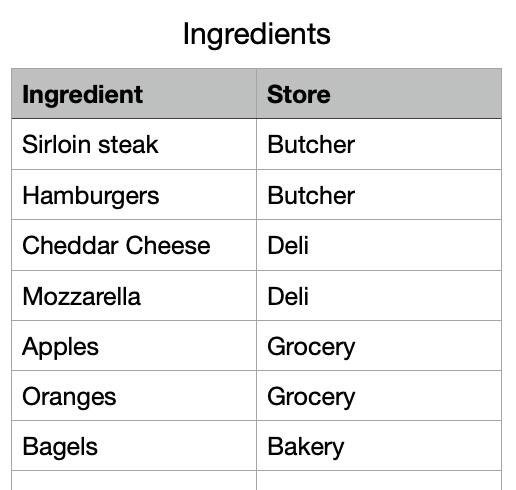
Then you can use the XLOOKUP function to cross-reference the tables. In your main Meal Planner table the Store column looks like:

The function is:
=XLOOKUP(B2, Ingredients::A, Ingredients::B, "", -1, -1)
this tells Numbers to take the value in B2 (in this case 'Hamburger') and to look for that value in Column A of the Ingredients table. If found, return the corresponding value from the B column of the Ingredients table.
If there's no match it returns empty (""), but you could put anything here.
the -1, -1 at the end just tell it how to search (exact match and top-to-bottom)
Hopefully that helps move you forwards.


