Numerical to words in Numbers spread sheet

After going through the forum…. I understood that there is no way to convert numerical values to words…Am I right ? How come apple didnt do this ? Am I missing some info ? Kindly guide me .

iPad Pro, iPadOS 18

Posted on Jan 20, 2025 4:13 AM

Reply
Question marked as Top-ranking reply

Posted on Jan 20, 2025 6:10 AM

vasanth_sac wrote:

no way to convert numerical values to words…


Years ago I saw convoluted ways to do this using formulas.


Here's a script that does it reasonably well.


use framework "Foundation"
use scripting additions
tell front document of application "Numbers"
	tell active sheet
		tell (first table whose selection range's class is range)
			set outStr to ""
			repeat with aCell in cells in (get its selection range)
				set theNumber to value of aCell
				set theInteger to theNumber div 1
				set theWords to my convertNumberToWords(theInteger)
				set theFraction to my convertDecimalToFraction(theNumber)
				set outStr to outStr & theWords & " and " & theFraction & return
			end repeat
		end tell
	end tell
end tell

set the clipboard to outStr

on convertNumberToWords(aNumber)
	tell current application's NSNumberFormatter to ¬
		set resultingText to localizedStringFromNumber_numberStyle_(aNumber, current application's NSNumberFormatterSpellOutStyle)
	return (resultingText as string)
end convertNumberToWords

on convertDecimalToFraction(aNumber)
	set integerPart to (aNumber div 1)
	set fractionPart to (aNumber - integerPart) * 100
	if fractionPart is 0 then
		return "00/100"
	else if fractionPart mod 10 is 0 then
		set fractionPart to fractionPart div 10
		return fractionPart & "/10"
	else
		return fractionPart div 1 & "/100" as text
	end if
end convertDecimalToFraction


  1. Copy-paste the above script in Script Editor (in Applications > Utilities).
  2. Select the cells with numbers that you want to convert to words.
  3. Click the triangle 'run' button in Script Editor.
  4. Click once in a top destination cell in a Numbers table.
  5. Command-v or Edit > Paste and Match Style to paste.


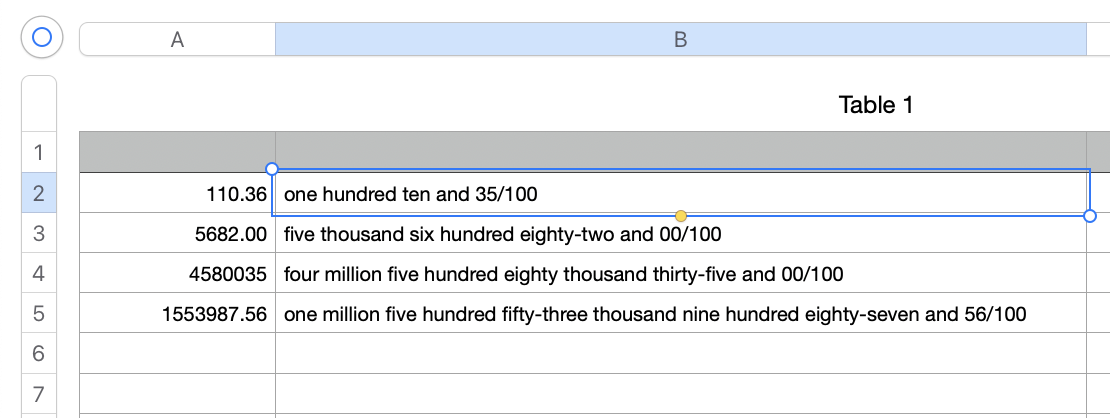
Here are sample results:


SG

1 reply
Question marked as Top-ranking reply

Jan 20, 2025 6:10 AM in response to vasanth_sac

vasanth_sac wrote:

no way to convert numerical values to words…


Years ago I saw convoluted ways to do this using formulas.


Here's a script that does it reasonably well.


use framework "Foundation"
use scripting additions
tell front document of application "Numbers"
	tell active sheet
		tell (first table whose selection range's class is range)
			set outStr to ""
			repeat with aCell in cells in (get its selection range)
				set theNumber to value of aCell
				set theInteger to theNumber div 1
				set theWords to my convertNumberToWords(theInteger)
				set theFraction to my convertDecimalToFraction(theNumber)
				set outStr to outStr & theWords & " and " & theFraction & return
			end repeat
		end tell
	end tell
end tell

set the clipboard to outStr

on convertNumberToWords(aNumber)
	tell current application's NSNumberFormatter to ¬
		set resultingText to localizedStringFromNumber_numberStyle_(aNumber, current application's NSNumberFormatterSpellOutStyle)
	return (resultingText as string)
end convertNumberToWords

on convertDecimalToFraction(aNumber)
	set integerPart to (aNumber div 1)
	set fractionPart to (aNumber - integerPart) * 100
	if fractionPart is 0 then
		return "00/100"
	else if fractionPart mod 10 is 0 then
		set fractionPart to fractionPart div 10
		return fractionPart & "/10"
	else
		return fractionPart div 1 & "/100" as text
	end if
end convertDecimalToFraction


  1. Copy-paste the above script in Script Editor (in Applications > Utilities).
  2. Select the cells with numbers that you want to convert to words.
  3. Click the triangle 'run' button in Script Editor.
  4. Click once in a top destination cell in a Numbers table.
  5. Command-v or Edit > Paste and Match Style to paste.


Here are sample results:


SG

This thread has been closed by the system or the community team. You may vote for any posts you find helpful, or search the Community for additional answers.

Numerical to words in Numbers spread sheet

Welcome to Apple Support Community
A forum where Apple customers help each other with their products. Get started with your Apple Account.