How do you fill a cell conditionally

I have a formula for random letters thanks to help here. What I can't work out now is a way to fill a cell with a random letter, but only if it is empty but not when there is a value in it. I have tried various If...then...else statements but I cannot get the desired results. My spreadsheet is about 40 by 50 cells.

Posted on Feb 13, 2025 4:02 PM

Reply
Question marked as Top-ranking reply

Posted on Feb 13, 2025 7:16 PM

Hi drrichard,


Spreadsheets can not "push" a value into a cell. They can only "pull" values from elsewhere.


Duplicate your original table (Table 1) and rename it Table 2. That will be your results table.

Table 2 will "pull" values from either the Lookup table (with RANDBETWEEN) if a cell in Table 1 is blank, or will "pull" the existing letter from Table 1 if it is not blank.
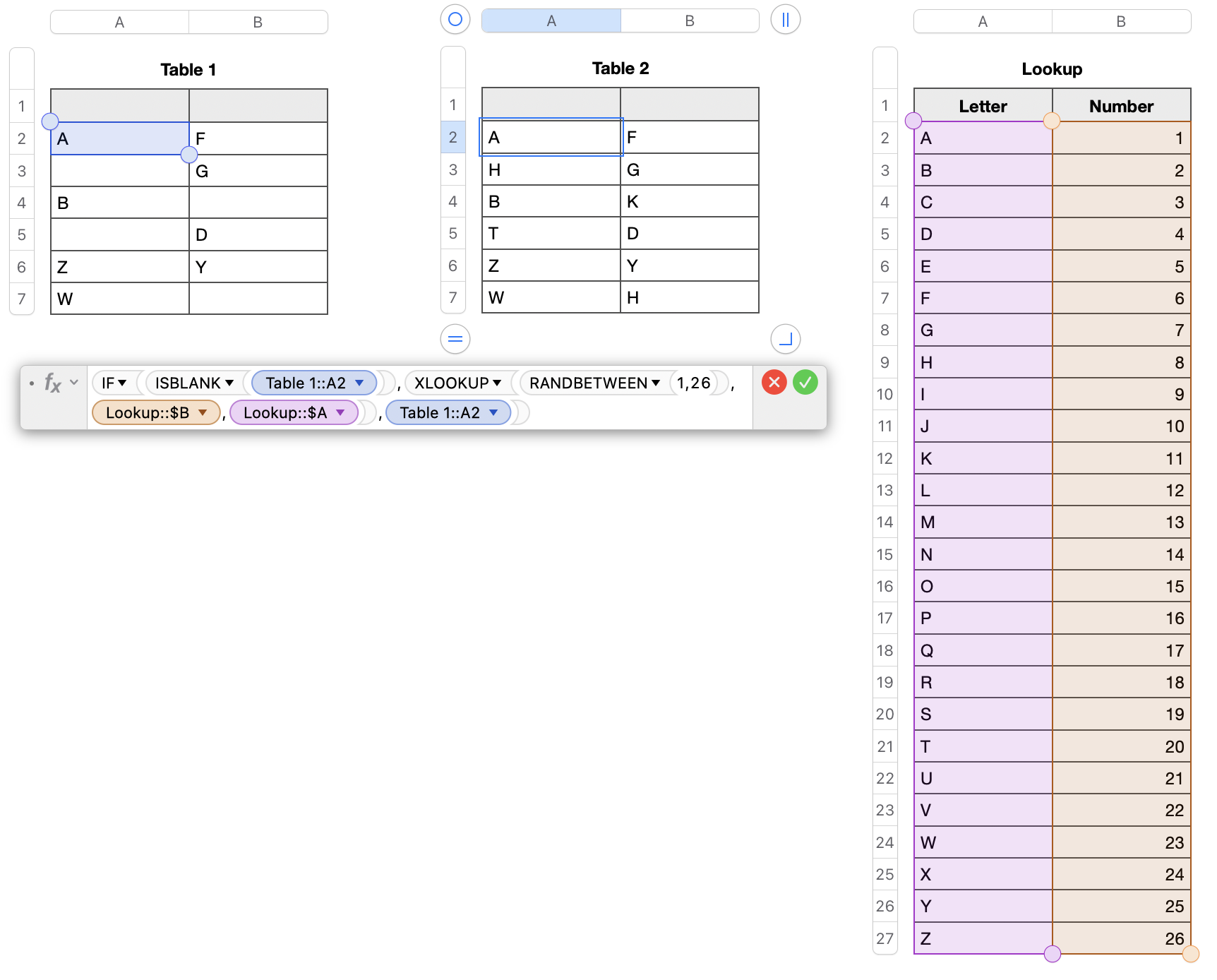


Formula in Cell A2 of Table 2 is

IF(ISBLANK(Table 1::A2),XLOOKUP(RANDBETWEEN(1,26),Lookup::$B,Lookup::$A),Table 1::A2)

Fill down and fill right.


In English, if the corresponding cell in Table 1 is blank, then:

  • use XLOOKUP to search for a random number between 1 and 26 in Column A and return the letter in Column B
  • else return the existing letter from Table 1


Regards,

Ian.


9 replies
Question marked as Top-ranking reply

Feb 13, 2025 7:16 PM in response to drrichard

Hi drrichard,


Spreadsheets can not "push" a value into a cell. They can only "pull" values from elsewhere.


Duplicate your original table (Table 1) and rename it Table 2. That will be your results table.

Table 2 will "pull" values from either the Lookup table (with RANDBETWEEN) if a cell in Table 1 is blank, or will "pull" the existing letter from Table 1 if it is not blank.


Formula in Cell A2 of Table 2 is

IF(ISBLANK(Table 1::A2),XLOOKUP(RANDBETWEEN(1,26),Lookup::$B,Lookup::$A),Table 1::A2)

Fill down and fill right.


In English, if the corresponding cell in Table 1 is blank, then:

  • use XLOOKUP to search for a random number between 1 and 26 in Column A and return the letter in Column B
  • else return the existing letter from Table 1


Regards,

Ian.


Feb 13, 2025 4:38 PM in response to drrichard

I don't understand what you're trying to do. By definition, your cell can't be empty if it has a formula that returns a random character...


Formulas can only change the cell they're in. They cannot change other cells directly (obvious, indirect changes can happen if another cell depends on this cell, but you can't tell any cell to directly set a value in another cell.


So what is it you're trying to do?

Feb 13, 2025 4:49 PM in response to Camelot

I have letters in many of the cells, but not all. I want to put random letters into the empty cells. I thought I could make a formula that, if the cell with the formula is empty, it puts in a random letter. If the already has a value then the cell is left unchanged.

Alternatively, I could make a matrix of random letters and find a way to move the matrix of letters I need into the corresponding cells. If you try to move a group of cells onto the random lettered cells the blanks come along with them and you cover up the random letter cells with empty cells, not the random letter that was already there.

This thread has been closed by the system or the community team. You may vote for any posts you find helpful, or search the Community for additional answers.

How do you fill a cell conditionally

Welcome to Apple Support Community
A forum where Apple customers help each other with their products. Get started with your Apple Account.
