Restoring Line app from iCloud

I replaced my older iPhone with a newer model, and I am backing up from iCloud. Every other app on my phone, reloaded successfully, but the line app is taking forever to make any progress. It’s been over two hours now, and it still says “loading”. Is this to be expected, or is something wrong?

iPhone 11

Posted on Feb 15, 2023 11:03 PM

Reply
1 reply

Feb 17, 2023 11:12 AM in response to RikiJay

Hi there RikiJay,


If certain apps are taking longer than expected to download on your new iPhone, these steps from If you can’t download or update apps on your iPhone or iPad can resolve what's happening:

1. Manually update the app
Learn how to manually update an app
 
2. Add a payment method
You might need to have a valid payment method on file, even if the app that you want to download is free.
Add a payment method
 
3. Resolve a problem with your payment method
If your payment method is expired, declined, or failed, or a message says 'billing problem with previous purchase'
 
4. Prioritize the download
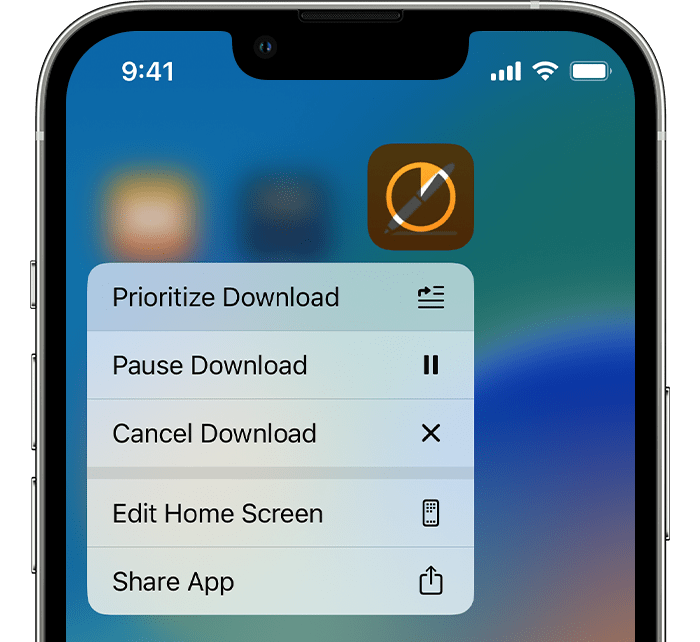
From the Home Screen, touch and hold the app. From the menu that appears, choose Prioritize Download.
 
Prioritize Download is at the top of the menu that appears when you touch and hold the app.
5. Restart your device
Restart your iPhone or iPad, then check to see if you can download or update apps.
Restart your iPhone
Restart your iPad


We hope that helps!

This thread has been closed by the system or the community team. You may vote for any posts you find helpful, or search the Community for additional answers.

Restoring Line app from iCloud

Welcome to Apple Support Community
A forum where Apple customers help each other with their products. Get started with your Apple Account.