iCloud+ with 50 GB of Storage Monthly
I have not received the february receipt iCloud+ with 50 GB of Storage, what do i need to do to receive it.
I have not received the february receipt iCloud+ with 50 GB of Storage, what do i need to do to receive it.
Hi Carlosalbertodavila,
We appreciate the clarification. You may want to start by double-checking any spam or junk folders/filters that you've set up for your email account. If you haven't received an invoice, it's possible you'll find it there.
You can also use the steps below to View your purchase history for the App Store, iTunes Store, and other Apple media services:
"On your iPhone or iPad
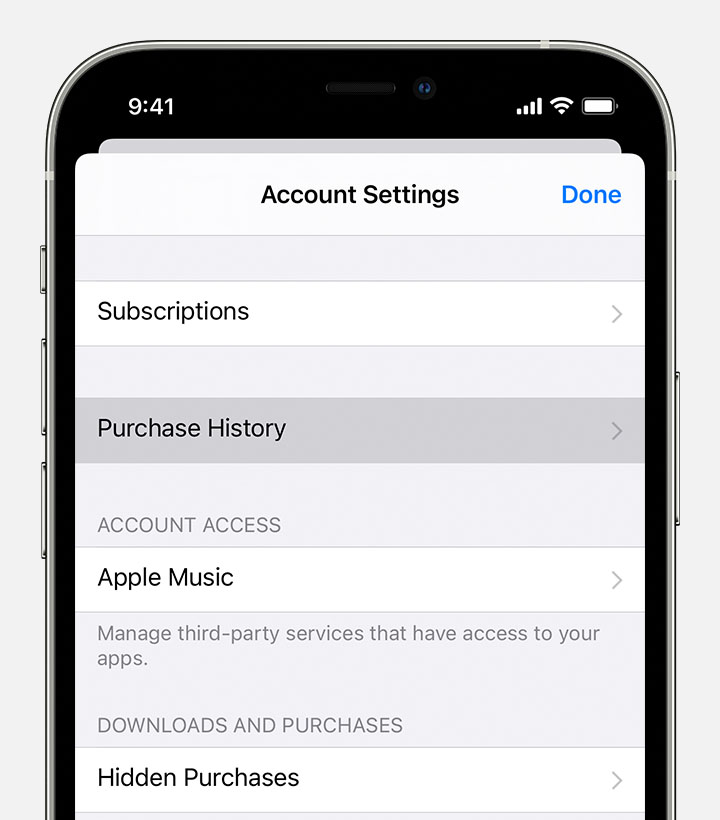
Once you find the item in question in your purchase history with the steps above, you can tap the purchase and you'll have a Resend option at the very bottom.
The steps above are for viewing purchase history on iOS devices, but you can click the link above to find steps for Mac or PC depending on the device you're using.
Take care.
Hi Carlosalbertodavila,
We appreciate the clarification. You may want to start by double-checking any spam or junk folders/filters that you've set up for your email account. If you haven't received an invoice, it's possible you'll find it there.
You can also use the steps below to View your purchase history for the App Store, iTunes Store, and other Apple media services:
"On your iPhone or iPad
Once you find the item in question in your purchase history with the steps above, you can tap the purchase and you'll have a Resend option at the very bottom.
The steps above are for viewing purchase history on iOS devices, but you can click the link above to find steps for Mac or PC depending on the device you're using.
Take care.
Hello Carlosalbertodavila,
Thank you for reaching out to Apple Support Communities, and we'll be happy to help in any way we can. We understand you're having issues with upgrading your iCloud storage. Follow the steps here to upgrade iCloud storage: Upgrade to iCloud+ - Apple Support
For more help, please reach out to Apple for help with billing here: Official Apple Support
We hope this helps.
Cheers!
No, i need my monthly receipt.
iCloud+ with 50 GB of Storage Monthly