Checkboxes and Lists

I am hoping someone can help a new comer to Numbers...


I have a meal planner that I am trying to link to a shopping list.


I have a list of ingredients with checkboxes for if I have them already or need to buy them and what store I get the from.


Column A is the check Box / B is the Ingredient / C is the quantity / D is the store.


So far I have IF A, "", B


I know you will all laugh, but I was proud to get this far having never used spreadsheets before now.


I am getting an outcome which is if the box is unticked it adds the ingredient to the list:


Two questions - how do I get the list to ignore blank cells (No Ingredients) and how do I place the ingredients on the right store shopping list? (IE Bakery / Butchers / Deli etc)

Posted on Dec 27, 2024 5:15 AM

Reply
2 replies

Dec 28, 2024 6:53 AM in response to Fish1470

Welcome to the world of spreadsheets :)


> how do I get the list to ignore blank cells (No Ingredients)


Without knowing your table structure, its impossible to answer.


For example, you said that column B is the ingredient, and that if column A is unchecked you copy the ingredient to 'the list'... by definition, if the ingredient is empty, there's nothing to copy... so it's not clear what you're trying to do here.


> how do I place the ingredients on the right store shopping list? (IE Bakery / Butchers / Deli etc)


That's a whole other level of Spreadsheet wizardry. You're going to need somewhere to store (no pun intended) which ingredients come from which stores - for all the magic, Numbers is dumb and doesn't inherently know that Steak comes from the butcher and bread from the bakery - so you're going to have to tell it.


As a start, you're likely to need some master ingredient table that lists all the ingredients with the store they come from. This can be pretty simple:
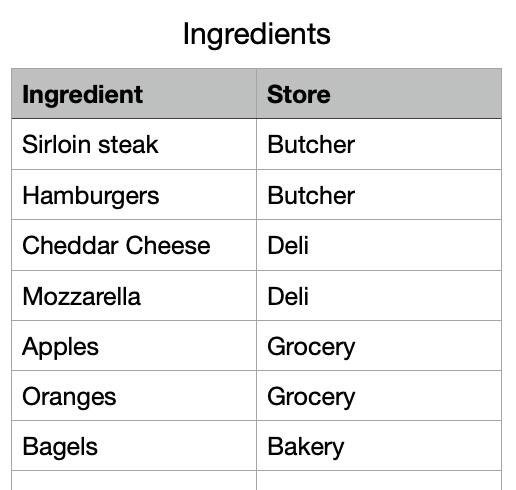


Then you can use the XLOOKUP function to cross-reference the tables. In your main Meal Planner table the Store column looks like:



The function is:


=XLOOKUP(B2, Ingredients::A, Ingredients::B, "", -1, -1)


this tells Numbers to take the value in B2 (in this case 'Hamburger') and to look for that value in Column A of the Ingredients table. If found, return the corresponding value from the B column of the Ingredients table.

If there's no match it returns empty (""), but you could put anything here.

the -1, -1 at the end just tell it how to search (exact match and top-to-bottom)


Hopefully that helps move you forwards.

Dec 28, 2024 7:02 AM in response to Fish1470

Without knowing more about your document it's hard to give advice. You have picked a hard project for a beginner, one that is complicated in spreadsheet apps. It is more naturally a problem for "database" apps.


But most likely, somewhere along the way, you'll probably want to learn about this function, which will string together values in separate cells:


TEXTJOIN - Apple Support


SG


This thread has been closed by the system or the community team. You may vote for any posts you find helpful, or search the Community for additional answers.

Checkboxes and Lists

Welcome to Apple Support Community
A forum where Apple customers help each other with their products. Get started with your Apple Account.

