When you print, you have an option to repeat the table headers on all pages. Your options are pretty much all or none. Therefore, if your table has 5 header rows, you'll repeat all 5 on each page.
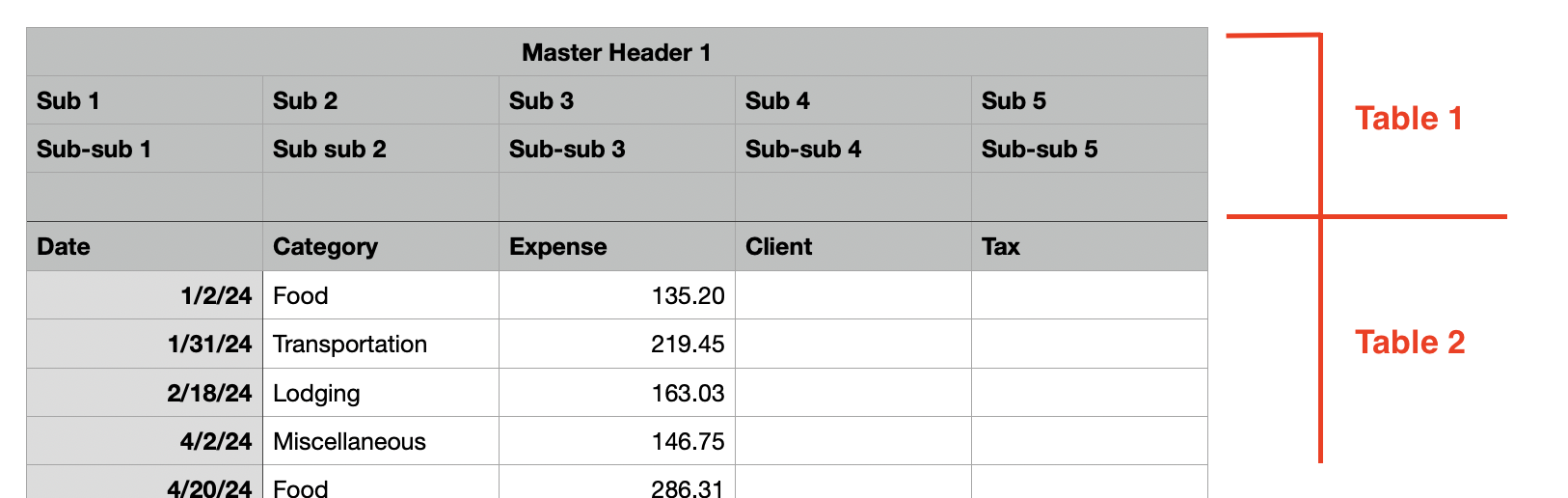
Indirectly, the only way I can think of achieving this is two use two tables - one 'dummy' table with 4 header rows positioned at the top of the sheet, then your actual data table with one header row positioned immediate below.
Align them properly on the page and visually it will look like 5 header rows, but only one table extends onto the second page and has its headers repeated:
which looks like this when printed:

Since Table 1 doesn't extend onto the second page, its headers are not repeated, but Table 2's are.

