Np622 wrote: … I know it is essentially a feature just to sync different devices,
Synchronize means "keep the same." When Photos discovers pictures at iCloud.com that are not on your iPhone, it will fix that by transferring missing pictures to your phone.
A different way to save space on your phone, without removing any pictures, is to use Optimize Storage. Optimize Storage saves space on your phone by keeping only smaller pictures there, and relying on the full files being kept at iCloud Photos. This way you can quickly scroll through all your pictures, even though they don’t take up so much space. Then, when you need the full pictures for printing or editing, etc, the phone grabs the full file from iCloud. This is very cool, but it does require internet connection to edit pictures. With Optimize Storage, you can save more than 90% of the storage that Photos would use otherwise.
You can turn on Optimize in Settings>Apps>Photos:
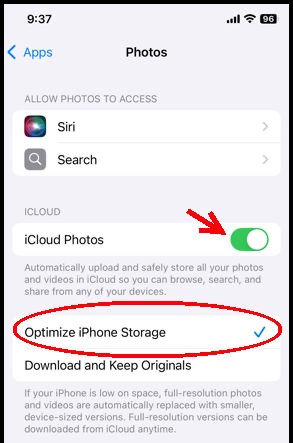
If you turn on Optimize Storage as you turn on iCloud, then only smaller files will be returned to the phone.
It was right of you to turn off iCloud before deleting pictures-- otherwise they would have been deleted from iCloud.com. Do keep in mind that iCloud won't save you from accidentally deleting pictures-- never defeat the 30 day safety feature of "Recently Deleted" without very careful thought!

