How to set up a running balance calculation on my new MacBook Air in Numbers

In Numbers, on my MacBook Air, I have a column of $ numbers, with - (minus sign) for money out and no prefix for money in and I want to be able to get a running total balance in the next column at any time as more $ numbers are added. How to set this up?

MacBook Air 15″, macOS 15.4

Posted on Apr 7, 2025 6:52 PM

Reply
Question marked as Top-ranking reply

Posted on Apr 7, 2025 7:02 PM

Assuming you have your money in/out in Column C, you can use this formula as a running total (just update "C" to your transaction and the first "2" to the row number of the first transaction).


=SUM(C$2:C2)


Then drag with autofill the rest of the way down the column.


[95]

4 replies
Question marked as Top-ranking reply

Apr 7, 2025 7:02 PM in response to DAI'41

Assuming you have your money in/out in Column C, you can use this formula as a running total (just update "C" to your transaction and the first "2" to the row number of the first transaction).


=SUM(C$2:C2)


Then drag with autofill the rest of the way down the column.


[95]

Apr 9, 2025 7:02 PM in response to DAI'41

***'41 wrote:

so much simpler than the other suggestions, which I couldn't get to work


Simpler is often better, but not always! Generally an "expanding range" as suggested above is a more robust situation. It, for example, avoids a problem like this:
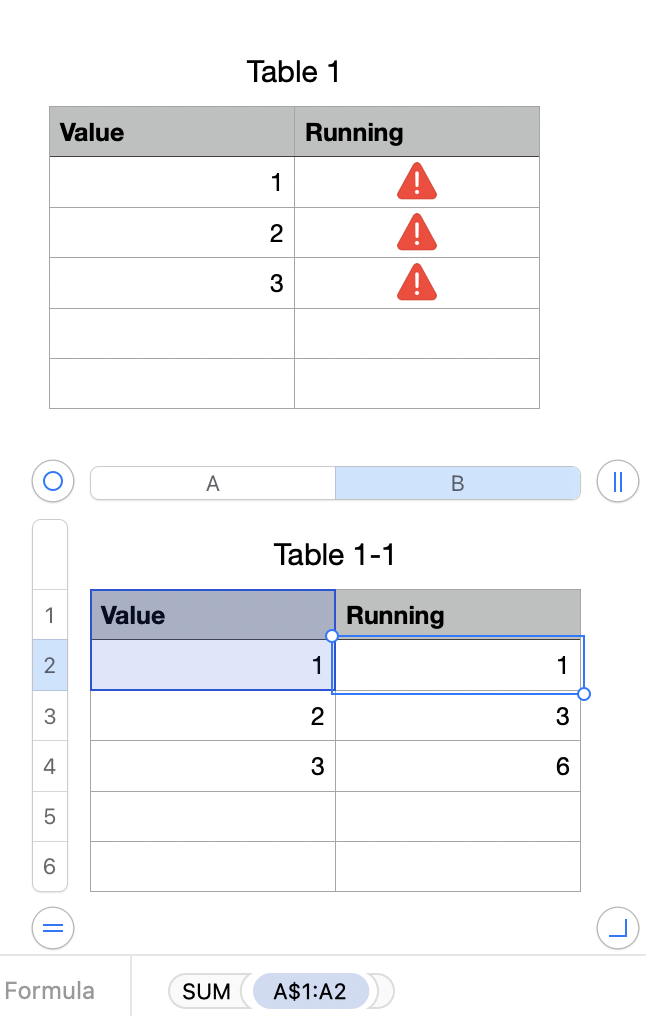


In the top table the "simple" solution:


In B2, filled down:


=B1+A2


The bottom table uses the "expanding range" approach:


In B2, filled down:


=SUM(A$1:A2)


The $ before the 1 anchors the first cell in the range, whereas A2 is not anchored and becomes A3, A4, A5, etc. as you fill the formula down the column.


The expanding range gracefully handles the cases where (as is typical in Numbers) you have a Header Row with text in it. It also is less likely to get messed up should you ever have to add or delete rows in the middle of the table.


SG

This thread has been closed by the system or the community team. You may vote for any posts you find helpful, or search the Community for additional answers.

How to set up a running balance calculation on my new MacBook Air in Numbers

Welcome to Apple Support Community
A forum where Apple customers help each other with their products. Get started with your Apple Account.