Which iMac to buy next?

I have a 27in screen, which I want to keep, but as my Mac is so slow now, browser won't upgrade, Google Drive doesn't work, loads of issues, doh, I guess I need to buy a new one...


I have a late 2013, 3.5GHz Core i7, 24GB RAM, since upgrading to Catalina it's become as slow as Windows 3.1.


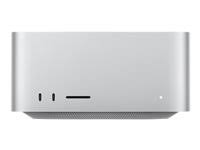
What is this Mac mini thing? Can I plug that in to my current iMac and use that as a monitor? I also want to keep using the mouse and keyboard I have now.


I write, so use Word etc. and am also a photographer, who uses a crap version of Adobe Elements because who can afford Photoshop these days. I also do web design through Wordpress.


Any advice appreciated.

Posted on Apr 12, 2025 5:45 AM

Reply
Question marked as Top-ranking reply

Posted on Apr 12, 2025 6:32 AM

The Mac mini is a legit Macintosh computer in an extremely small form factor. Add a screen, keyboard and mouse or trackpad and it's every bit the Mac that your old iMac is. Use the mouse and keyboard you already have.

Mac mini - Technical Specifications - Apple


However, you cannot use your old iMac as a monitor with the Mac mini. The old target display mode that once allowed that has been dead for a number of years now. To setup and use the mini you'll need a dedicated monitor. That's not a bad thing. The mini can use most any monitor on the consumer market. Choose one that fits your needs.


Couple the Mac mini with a nice monitor in the range of $100-$350 - or whatever your budget supports - and you'll have a Mac system that rivals the new iMacs and still save $500 or more.


11 replies
Question marked as Top-ranking reply

Apr 12, 2025 6:32 AM in response to davelewis1

The Mac mini is a legit Macintosh computer in an extremely small form factor. Add a screen, keyboard and mouse or trackpad and it's every bit the Mac that your old iMac is. Use the mouse and keyboard you already have.

Mac mini - Technical Specifications - Apple


However, you cannot use your old iMac as a monitor with the Mac mini. The old target display mode that once allowed that has been dead for a number of years now. To setup and use the mini you'll need a dedicated monitor. That's not a bad thing. The mini can use most any monitor on the consumer market. Choose one that fits your needs.


Couple the Mac mini with a nice monitor in the range of $100-$350 - or whatever your budget supports - and you'll have a Mac system that rivals the new iMacs and still save $500 or more.


Apr 12, 2025 6:32 AM in response to davelewis1

Your current Mac can not be used as a monitor. You'll need to purchase a monitor to use with your Mac mini, but they're not horribly expensive these days.


Continuing to use your current mouse and keyboard shouldn't present a problem.


The M4 based iMacs are a great choice if you want an all in one. Both the iMac and Mac mini can drive multiple displays.


If money is an issue, you can save some by purchasing a refurbished device from Apple. Refurbished Mac Deals - Apple


They come with the exact same warranty as new product and are usually completely indistinguishable from new.


You are going to have to upgrade the versions of MS Office and Adobe products to run on a modern Mac or find alternatives.


Apr 12, 2025 7:24 AM in response to davelewis1

+1 D.I. Johnson and the others are spot on.


To start with, have a look at > Mac - Which Mac is best for me? - Apple


All of the new Silicone Mac's Mac mini's and iMac's will run circles around your old iMac.


The new Silicone Mac's can not run any of those old Adobe, Word or Photoshop programs.


You can use most any keyboard and mouse with the Mac mini, including what you currently have.


The old 2013 27" iMac will not work as a display for any new Silicone Mac mini, Mac Studio, Mac Pro or iMac.


You will need to get and use an external display for the Mac mini, see > Connect a display to Mac mini - Apple Support

Apr 12, 2025 8:15 AM in response to davelewis1

davelewis1 wrote:

Had a quick look at mini, can't see an SD card slot? Also, I want 2TB HDD but prices are so high. Can you add RAM, like I did with my iMac?


There isn't a SD card slot on the Mac mini. You'd need to get an external card reader, or a dock/hub that had a card reader built in.


The Mac mini has a solid-state drive (SSD), not a mechanical hard drive. I would recommend getting at least 512 GB of internal SSD storage. External drives are pretty cheap. I'm using a Crucial X9 Pro (a SSD that's about the size of a credit card) with my desktop Mac. You can currently get 2 TB ones for $120 – $130 USD, depending on whether you get the "PC" version or the "Mac" version (reference: B&H Photo Video – Crucial X9 Pro SSDs).


You cannot add RAM to any Apple Silicon Mac after purchase.

Apr 12, 2025 11:04 AM in response to davelewis1

I wholeheartedly agree with D.I. Johnson and others about the Mini. I just got an M4 Mini with 16 GB RAM, 1 TB SSD storage for $1086. I paired that with a 32" 4K monitor w/speakers for $316. The total was $650 less than a comparatively configured new 24" iMac.


You can get a 27" or 32" 4K monitors from anywhere from $150 to $350 depending on brand, size and features. The Mini runs circles around my 2017 (i7) 27" iMac with SSD boot drive.


Apr 12, 2025 6:54 AM in response to davelewis1

"I write, so use Word etc. and am also a photographer, who uses a crap version of Adobe Elements because who can afford Photoshop these days. I also do web design through Wordpress."


Be aware that no matter which new Mac you choose you almost certainly will need to upgrade the two apps you mention to run on the new hardware. These days Photoshop is subscription based only on a monthly or yearly plan. PhotoShop Elements can still be purchased outright. Microsoft 365 is also subscription based now.


If that’s not in the cards you can still use those apps on the 2013 iMac if you decide to keep it.

Apr 12, 2025 8:57 AM in response to davelewis1

davelewis1 wrote:

I write, so use Word etc. and am also a photographer, who uses a crap version of Adobe Elements because who can afford Photoshop these days. I also do web design through Wordpress.


You might also want to take a look at the Affinity V2 applications: Photo, Designer, and Publisher. You can get Affinity Photo V2 for macOS for $70 – or macOS + Windows + iPad versions of all three applications for $165. (Sometimes less – they run sales every once in a while.)


Affinity


I'm not sure how well Affinity Photo V2 compares to full Photoshop, but I believe that is more full-featured than Photoshop Elements.


There is also the GNU Image Manipulation Program (GIMP). It's free and has versions for Linux, Windows, and macOS.


GIMP – GNU Image Manipulation Program


------------------------------


Microsoft has followed Adobe's lead in adopting a "subscription" (rental) model. Microsoft still sells a one-time purchase version of Office ("Office Home 2024"), but they seem to be trying to steer people to "subscriptions".


Microsoft – Compare All Microsoft 365 Products


There is a free office suite called LibreOffice that can work with many Microsoft Office documents and that has versions for Linux, Windows, and Macs.


LibreOffice

Apr 12, 2025 7:34 AM in response to davelewis1

You can't add RAM to any Apple silicone based Mac. As for storage, you can always add an external SSD if you need more storage. Much more cost effective. Hubs with SD card slots are also cheap and readily available.


Finally, you need to keep in mind that prices advertised in the US do not include sales tax, which varies from state to state and is added on at the time of purchase. If I'm not mistaken, UK prices include all applicable taxes.


This thread has been closed by the system or the community team. You may vote for any posts you find helpful, or search the Community for additional answers.

Which iMac to buy next?

Welcome to Apple Support Community
A forum where Apple customers help each other with their products. Get started with your Apple Account.