How to display dates or months in a Numbers chart?

I enter almost every day into a spreadsheet the reading of my electricity meter to calculate how many kwh I consume every day throughout the year. I have completed February, March, April so far. And I have a chart to show the progress. So far so good except...I can't get it to show dates or months. It shows untitled 1, 2, 3 where the dates should be


[Re-Titled by Moderator]

MacBook Pro 13″, macOS 15.4

Posted on Apr 29, 2025 11:46 PM

Reply
Question marked as Top-ranking reply

Posted on Apr 29, 2025 11:54 PM

It looks as if you are using a 'category" chart (2D Column) and your dates are evenly spaced.


If so make sure you first define the column with the dates as a Header Column (shaded by default), then select the cells, and insert the chart.


Numbers gets the labels for the x-axis from a Header Column.


For working examples of charts be sure to have a look at the 'Charting Basics' template at File > New in the menu.


I recommend turning Categories off before selecting cells and inserting a chart.


SG

3 replies
Question marked as Top-ranking reply

Apr 29, 2025 11:54 PM in response to Marino Pascal

It looks as if you are using a 'category" chart (2D Column) and your dates are evenly spaced.


If so make sure you first define the column with the dates as a Header Column (shaded by default), then select the cells, and insert the chart.


Numbers gets the labels for the x-axis from a Header Column.


For working examples of charts be sure to have a look at the 'Charting Basics' template at File > New in the menu.


I recommend turning Categories off before selecting cells and inserting a chart.


SG

Apr 30, 2025 1:44 AM in response to Marino Pascal

Marino Pascal wrote:

Now if I wanted a monthly chart?


Pivot Tables are particularly good at aggregating data by month. They do so automatically. (You can also click the circled i for other periods. And summarize by Average, Maximum, Minimum, etc instead of Sum.)


Click in the table with the data, choose Organize > Create Pivot Table > On Current Sheet from the menu, and in the Pivot Options pane that appears drag the fields down into the relevant boxes below as shown.


Then you select the cells in the Pivot Table and insert a chart.
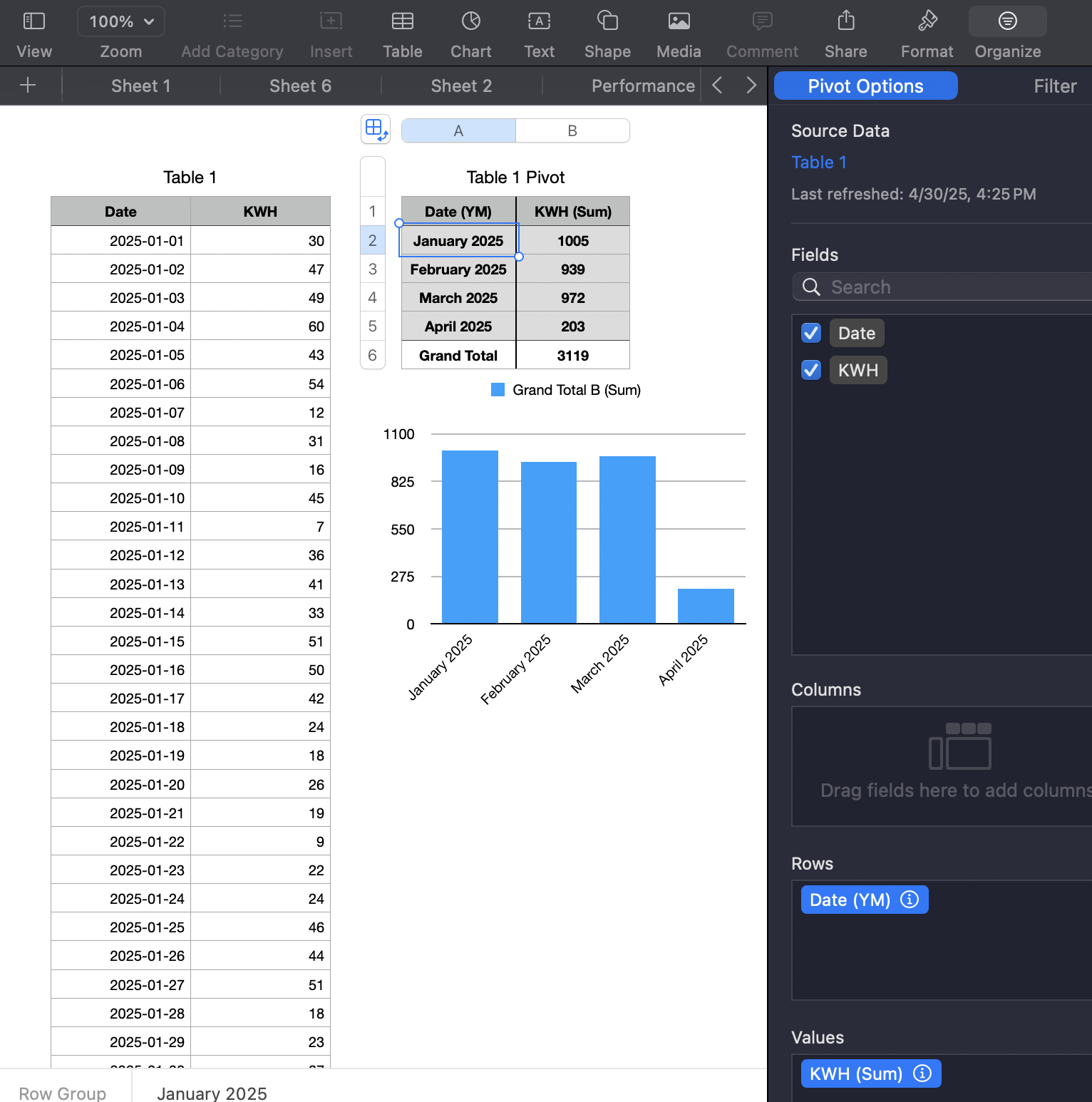


I you don't like the way the Pivot Table looks you can copy-paste its cells into a "regular" table, format that, and b base the chart on that table.


Pivot Tables are fast. This took me less than a minute to set up. Much quicker than entering and debugging formulas with SUMIF, although you can do it the "old school" hard way with those instead if you want.


Intro to pivot tables in Numbers on Mac - Apple Support


The basic idea of all approaches is to first aggregate your data by month in a table, and base your chart on that table.


SG

This thread has been closed by the system or the community team. You may vote for any posts you find helpful, or search the Community for additional answers.

How to display dates or months in a Numbers chart?

Welcome to Apple Support Community
A forum where Apple customers help each other with their products. Get started with your Apple Account.