Why is Numbers app incorrectly adding values in my spreadsheet?

Some math is unaccountably wrong. I've posted an example from part of a spreadsheet tracking loan disbursements for a loan with only one disbursement; the advanced funds should total the one non-zero amount advanced the one date an advance was made under the loan.


The hovering formula bar shows the function that should be calculated in cell B10.


Any ideas what causes this, or how to get a resolution?


[Re-Titled by Moderator]

Mac Studio, macOS 15.4

Posted on May 8, 2025 2:33 PM

Reply
Question marked as Top-ranking reply

Posted on May 8, 2025 3:17 PM

I have literally never seen this before. This is as basic as it gets and you have to think if this was an endemic problem, someone would have commented before.


Therefore I think there has to be something specific to this spreadsheet.


I am able to get something similar to what you have by setting conditional formatting on the cells to suppress values less than 10,000 (or, more specifically, set the cells to show '$0.00' if their inherent value is less than 10,000):
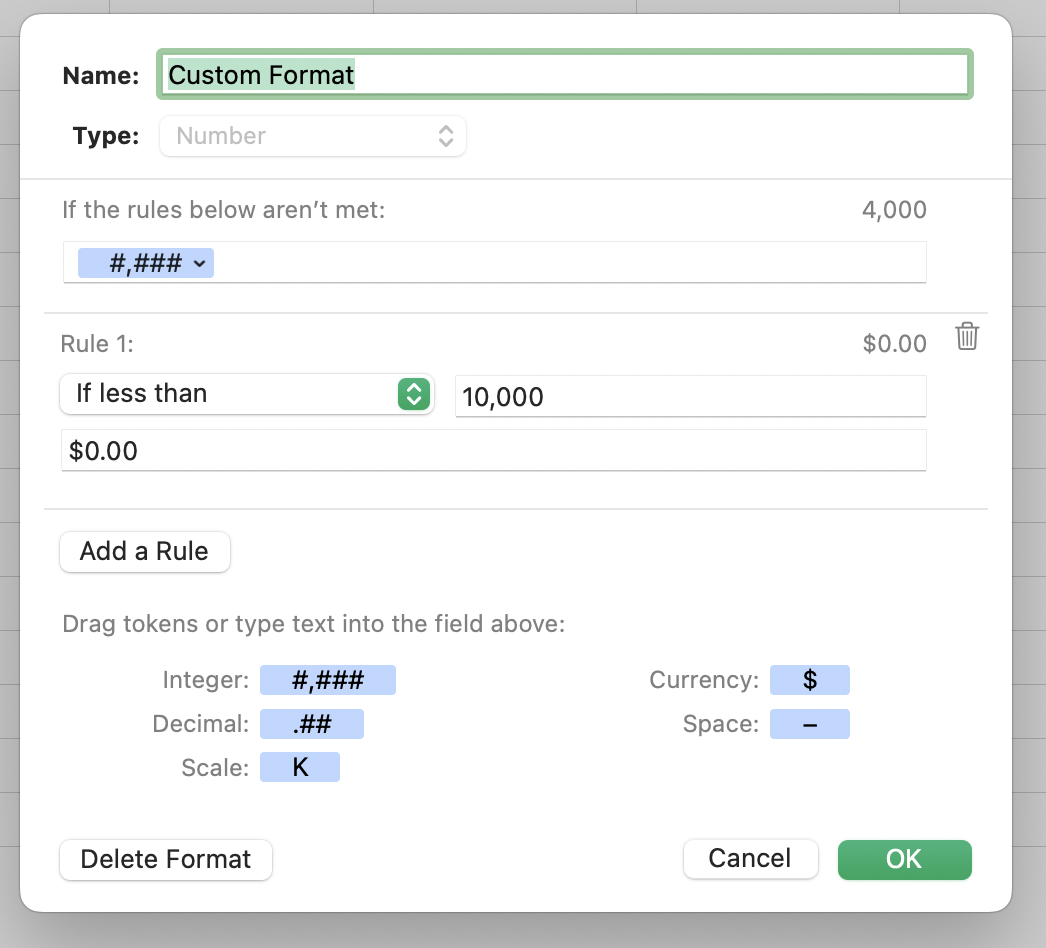


In this way I can set values in cells B3:B9 that are less than $10,000 and they don't show. However, the cell still has that actual, underlying value, and that is what SUM() uses, not the displayed value. This is true of every spreadsheet since, like, forever.


So the question is what values are actually in cells B3:B9? If you click on the cell, what does the formula behind that cell say? What does the window footer say (where it shows values for selected cells).


Moreover, what is it you want these cells to do? If you want them to actually report $0.00, then you need a formula that returns that, rather than just suppressing the display format.


8 replies
Question marked as Top-ranking reply

May 8, 2025 3:17 PM in response to sea_dragons

I have literally never seen this before. This is as basic as it gets and you have to think if this was an endemic problem, someone would have commented before.


Therefore I think there has to be something specific to this spreadsheet.


I am able to get something similar to what you have by setting conditional formatting on the cells to suppress values less than 10,000 (or, more specifically, set the cells to show '$0.00' if their inherent value is less than 10,000):


In this way I can set values in cells B3:B9 that are less than $10,000 and they don't show. However, the cell still has that actual, underlying value, and that is what SUM() uses, not the displayed value. This is true of every spreadsheet since, like, forever.


So the question is what values are actually in cells B3:B9? If you click on the cell, what does the formula behind that cell say? What does the window footer say (where it shows values for selected cells).


Moreover, what is it you want these cells to do? If you want them to actually report $0.00, then you need a formula that returns that, rather than just suppressing the display format.

May 9, 2025 12:42 AM in response to sea_dragons

sea_dragons wrote:

Any ideas what causes this, or how to get a resolution?


"Getting a resolution" involves not "throwing away" the document! And being forthright in giving details on how this result was obtained..


Did you import this from Excel? The layout of the table is awfully "Excelsy," not what one would normally do in Numbers. Have a look at the templates at File > New in the menu for good examples of well constructed Numbers documents.


BTW, I can easily mimic the result.


All it took was little trickery with Custom Format.


Selecting each cell and looking lower left to see what value is in it will quickly identify which cells display $0.00 but have values other than $0.00.


SG


May 9, 2025 11:55 AM in response to SGIII

No, SGIII, the sheet that contained these cells was a copy of a Numbers sheet in a workbook tracking a number of similar transactions, and it didn't occur to me to keep it when I was worried about ensuring more transactions didn't have similar nonsense in them that I didn't notice because the math wasn't clearly wrong on sight. None of this was imported from another application, just years of Numbers.


It didn't occur to me to consider the format might have been manipulated, as I have never done that and I made the sheet by copying another sheet I made, in which I hadn't done that.


I'll be on the lookout for another specimen and will try to keep a copy should that happen, it's kind of alarming though to get such a result while depending on a spreadsheet to deliver data for a live transaction.

This thread has been closed by the system or the community team. You may vote for any posts you find helpful, or search the Community for additional answers.

Why is Numbers app incorrectly adding values in my spreadsheet?

Welcome to Apple Support Community
A forum where Apple customers help each other with their products. Get started with your Apple Account.