There are two problems with your formula.
The first is that your definition for the ROWS() function is invalid:
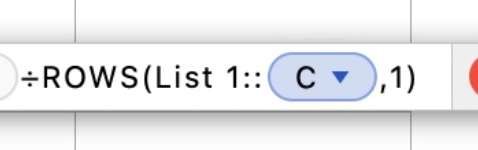
Did you manually type "List 1::"? because that's not how it should be done.
IF it's needed, the table name should be displayed within the bubble:
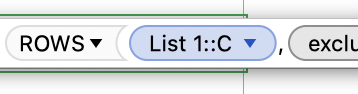
You can correct this by deleting the 'List 1::' text that's there. This should result in the correctly formatted reference. The table name is only needed if you're referencing a different table (which doesn't look like the case here?).
Even so, the second problem is that this won't work for your layout.
As noted, your layout is very 'Excel-like', using blank rows to delineate chunks of data. Technically there's nothing wrong with this, but it will affect your calculation. In this case, you're dividing the number of 'Completed' entries by the number of rows in the table. The ROWS() command will return the complete row count, including those blank rows.
For example, from what I can see, your table has 255 rows. There might be 100 assignments to complete, and let's assume every single one of them might be done.
=COUNTIF(C,"Completed")
returns 100
=ROWS(C,1)
returns 255
So your calculation results in 100/255, or a ≈39% completion ratio.
In this case you're better off comparing the number of 'Completed' to the number of assignments, which can be determined via:
=COUNTA(B)
which counts the number of non-blank cells in column B (the assignment type).
So, your percentage should look something like:
=COUNTIF(C,"Completed")/COUNTA(B)



