Apple Display camera doesn't work after MacOS Tahoe upgrade

My Apple Display (2016)'s camera no longer works after upgrading to MacOS Tahoe 26.1 on my MacBook Air M3 (2024). The camera has worked through every single upgrade with my old MacBook Pro and the new MacBook Air. I've gone through the basic debugging recommended on the drbuho.com website: restarting the MacBook after unplugging the monitor, checking app permissions, but haven't gone deeper with camera-related processes, starting the MacBook in safe mode, or resetting the system management controller. I don't think that those will help since the problem is no doubt a bug in MacOS Tahoe.


I'd appreciate it if this bug was fixed in the next update to Tahoe, as soon as possible.

MacBook Air 13″, macOS 26.1

Posted on Nov 8, 2025 7:21 AM

Reply
Question marked as Top-ranking reply

Posted on Nov 8, 2025 8:49 AM

Calcarmitsu wrote:

My Apple Display (2016)'s camera no longer works after upgrading to MacOS Tahoe 26.1 on my MacBook Air M3 (2024). The camera has worked through every single upgrade with my old MacBook Pro and the new MacBook Air.

I've gone through the basic debugging recommended on the drbuho.com website:

restarting the MacBook after unplugging the monitor, checking app permissions, but haven't gone deeper with camera-related processes, starting the MacBook in safe mode, or resetting the system management controller.

I don't think that those will help since the problem is no doubt a bug in MacOS Tahoe.

I'd appreciate it if this bug was fixed in the next update to Tahoe, as soon as possible.


I can not speak to your reference above...however


Uninstall all third party apps that are Cleaners/Optimizers/VPN/Anti-Virus

all known to cause issues on the macOS


unplug all non-essential peripherals when testing


is the camera hardware recognized in the System Information...(?) No hardware no camera.

>(Option key) System Information>Hardware Camera
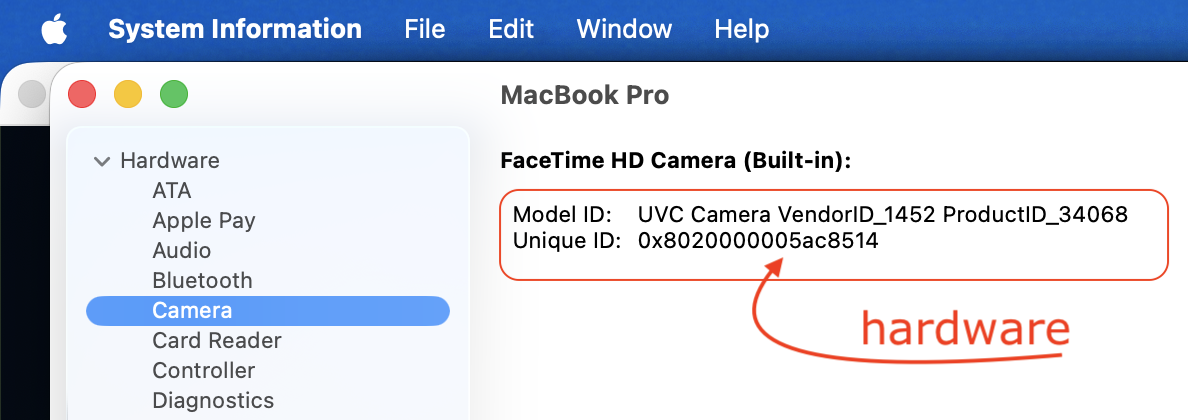


—Test issue in another user (or guest user) account Change Users & Groups settings on Mac - Apple Support

This will tell you if it a universal issue or isolated to your user/admin account. 


You can try launching the PhotoBooth.app and test.


you can reinstall macOS on top of your existing macOS and compare the results

Recovery (both M1/M2/M3/M4 and Intel) — How to reinstall macOS - Apple Support


here is a light weight third party app that may shed some light if needed.

https://objective-see.org/products/oversight.html


To be proactive you can file a bug report / submit your Apple Feedback here: Product Feedback - Apple


Further Support—


Call Customer Support (800) MY–APPLE (800–692–7753)


or on line https://getsupport.apple.com/


or call AppleCare Support at 1-800-APLCARE (800-275-2273)


Outside the USA—Contact Apple for support and service by phone

See a list of Apple phone numbers around the world.

Contact Apple Support - Apple Support


3 replies
Question marked as Top-ranking reply

Nov 8, 2025 8:49 AM in response to Calcarmitsu

Calcarmitsu wrote:

My Apple Display (2016)'s camera no longer works after upgrading to MacOS Tahoe 26.1 on my MacBook Air M3 (2024). The camera has worked through every single upgrade with my old MacBook Pro and the new MacBook Air.

I've gone through the basic debugging recommended on the drbuho.com website:

restarting the MacBook after unplugging the monitor, checking app permissions, but haven't gone deeper with camera-related processes, starting the MacBook in safe mode, or resetting the system management controller.

I don't think that those will help since the problem is no doubt a bug in MacOS Tahoe.

I'd appreciate it if this bug was fixed in the next update to Tahoe, as soon as possible.


I can not speak to your reference above...however


Uninstall all third party apps that are Cleaners/Optimizers/VPN/Anti-Virus

all known to cause issues on the macOS


unplug all non-essential peripherals when testing


is the camera hardware recognized in the System Information...(?) No hardware no camera.

>(Option key) System Information>Hardware Camera


—Test issue in another user (or guest user) account Change Users & Groups settings on Mac - Apple Support

This will tell you if it a universal issue or isolated to your user/admin account. 


You can try launching the PhotoBooth.app and test.


you can reinstall macOS on top of your existing macOS and compare the results

Recovery (both M1/M2/M3/M4 and Intel) — How to reinstall macOS - Apple Support


here is a light weight third party app that may shed some light if needed.

https://objective-see.org/products/oversight.html


To be proactive you can file a bug report / submit your Apple Feedback here: Product Feedback - Apple


Further Support—


Call Customer Support (800) MY–APPLE (800–692–7753)


or on line https://getsupport.apple.com/


or call AppleCare Support at 1-800-APLCARE (800-275-2273)


Outside the USA—Contact Apple for support and service by phone

See a list of Apple phone numbers around the world.

Contact Apple Support - Apple Support



Nov 20, 2025 9:29 AM in response to Sharkflash

Thanks for the tips. I did verify that the display camera is recognized by the system. However, it still isn't recognized by FaceTime or Zoom. There aren't any 3rd party apps that would be an issue.


Rather than digging deeper and potentially messing up my laptop, I decided to put it on a stand and use its camera (which still works) for video calls. I'm hoping that the next OS update will reactivate the display camera!

Apple Display camera doesn't work after MacOS Tahoe upgrade

Welcome to Apple Support Community
A forum where Apple customers help each other with their products. Get started with your Apple Account.