How to free up space from System Data?


Hi, this is my ipad mini5, I have been using it since it released. I like it very much until recently it stops working for a few seconds to minutes after restarting. I learned it is a storage issue, so I backed up and erased it. However, the System Data is still very big. Can anybody help me with this issue?

To my knowledge, restore it via computer may help, but that would force the system to update. But I don't want the new version of ipados, actually I always regret to update system since I did it for the first time, for example, I really miss the function that you can see the storage in files app.


Why is this happening and is there anything else I can try?

Thanks, JY

Posted on Dec 15, 2025 3:08 PM

Reply
Question marked as Top-ranking reply

Posted on Dec 15, 2025 4:01 PM

System storage includes a lot of cached data. iPadOS16 and later appear to make more use of available storage for temporary system caches.


Reported System Data (a.k.a. “other data”) can be expected to fluctuate. Your iPad will automatically and optimally manage its available system resources, using available free space to cache data and improve overall performance.


The only element of system storage that you can directly influence is perhaps your browser caches - which you can manually clear if you wish to do so.


For Safari:

Settings > Safari > Clear History & Website Data


For other browsers, you’ll need to find the relevant section of the App settings - which may be within the App itself.


Otherwise, transient system caches can be significantly reduced by performing a forced-restart of your iPad - although caches, by their nature, will again accumulate and be automatically managed by the operating system.


Force restart iPad (models with Face ID or with Touch ID in the top button)

If your iPad doesn’t have the Home button, do the following:

  1. Press and quickly release the volume button nearest to the top button.
  2. Press and quickly release the volume button farthest from the top button.
  3. Press and hold the top button.
  4. When the Apple logo appears, release the top button.
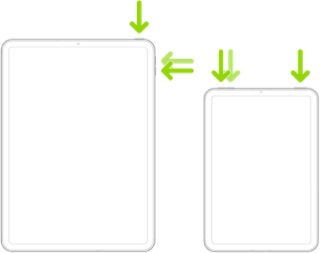


Force restart iPad (models with the Home button)

Press and hold the top button and the Home button at the same time. When the Apple logo appears, release both buttons.



Cached system data can also be cleared with a restore. More information about clearing system/other data is outlined here:

Clear Other storage on your iPhone or iPad - Apple Support

5 replies
Question marked as Top-ranking reply

Dec 15, 2025 4:01 PM in response to juhu858

System storage includes a lot of cached data. iPadOS16 and later appear to make more use of available storage for temporary system caches.


Reported System Data (a.k.a. “other data”) can be expected to fluctuate. Your iPad will automatically and optimally manage its available system resources, using available free space to cache data and improve overall performance.


The only element of system storage that you can directly influence is perhaps your browser caches - which you can manually clear if you wish to do so.


For Safari:

Settings > Safari > Clear History & Website Data


For other browsers, you’ll need to find the relevant section of the App settings - which may be within the App itself.


Otherwise, transient system caches can be significantly reduced by performing a forced-restart of your iPad - although caches, by their nature, will again accumulate and be automatically managed by the operating system.


Force restart iPad (models with Face ID or with Touch ID in the top button)

If your iPad doesn’t have the Home button, do the following:

  1. Press and quickly release the volume button nearest to the top button.
  2. Press and quickly release the volume button farthest from the top button.
  3. Press and hold the top button.
  4. When the Apple logo appears, release the top button.


Force restart iPad (models with the Home button)

Press and hold the top button and the Home button at the same time. When the Apple logo appears, release both buttons.


Cached system data can also be cleared with a restore. More information about clearing system/other data is outlined here:

Clear Other storage on your iPhone or iPad - Apple Support

Dec 15, 2025 3:28 PM in response to sberman

I don't understand why you think so, but absolutely no updates to me.

It won't solve any problems, but it's guaranteed to cause you inconvenience, especially new ipados on old device. Because some new features doesn't support old device, others which I don't need but consume a lot computer resources cannot be removed or stopped.

Dec 15, 2025 6:29 PM in response to juhu858

juhu858 wrote:

I don't understand why you think so, but absolutely no updates to me.
It won't solve any problems,

Other than closing potential security vulnerabilities. I don’t know what version you are on, but here is what 26 and later vulnerabilities are resolved by updating:


About the security content of iOS 26 and iPadOS 26 - Apple Support

About the security content of iOS 26.0.1 and iPadOS 26.0.1 - Apple Support

About the security content of iOS 26.1 and iPadOS 26.1 - Apple Support

About the security content of iOS 26.2 and iPadOS 26.2 - Apple Support


These versions fix a total of 123 security issues

How to free up space from System Data?

Welcome to Apple Support Community
A forum where Apple customers help each other with their products. Get started with your Apple Account.