rounding the result of a division formula in numbers

How does one write the correct formula to calculate a division function for a spreadsheet in Numbers so that the result only displays two digits to the right of the decimal point?

iMac 27", macOS 10.14

Posted on Jun 30, 2019 3:21 PM

Reply
Question marked as Top-ranking reply

Posted on Jun 30, 2019 4:03 PM

Hi Dongha,


If you want the result to display two digits after the decimal, you can format the cell to contain a number and display two places after the decimal.


If you want the actual result to be rounded to two places after the decimal, wrap the formula in ROUND(formula,2)


Examples:
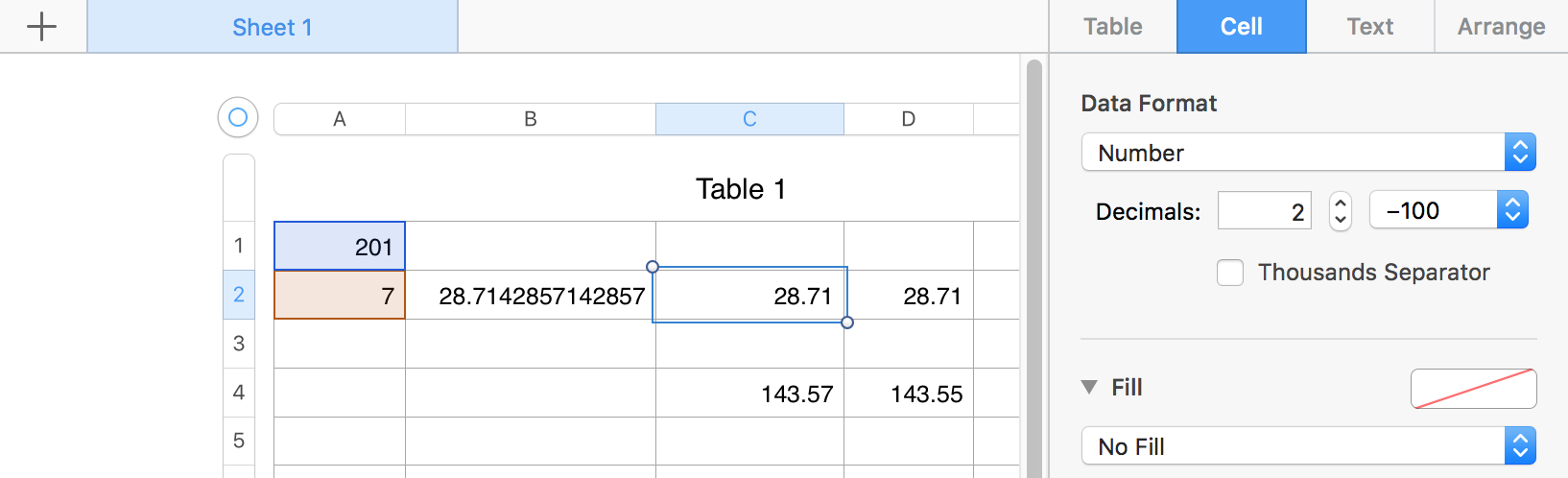

B2 contains the formula A1/A2 and has the cell formatted to Automatic with Decimals also left at Auto,


The result is displayed to 15 digit precision, with 13 of those digits after the decimal.


C2 contains the same formula, and produces the same reslt, but the cell is formatted as shown in the Inspector panel to the right.


D2 contains the same formula, wrapped in ROUND: ROUND(A1/A2,2). The value displayed is the same as displayed in C2, but in this cell, that is the actual result of the modified formula.


C4 and D4 contain the same simple formula:


C4: C2*5    D4: D2*5


Each formula works with the actual value in the cell two rows above it, and presents the result with the same formatting as in that cell. Note the difference in results due to the difference in actual value in 2 and D2.


Either rounding method will work for the displayed value. Which applies to your situation depends on what you are doing with the results of the initial division in row 2. If you will use those values in further calculations, you'll need to decide whether the actual value or the rounded value is appropriate to that calculation.


Regards,

Barry

3 replies
Question marked as Top-ranking reply

Jun 30, 2019 4:03 PM in response to Dongha

Hi Dongha,


If you want the result to display two digits after the decimal, you can format the cell to contain a number and display two places after the decimal.


If you want the actual result to be rounded to two places after the decimal, wrap the formula in ROUND(formula,2)


Examples:


B2 contains the formula A1/A2 and has the cell formatted to Automatic with Decimals also left at Auto,


The result is displayed to 15 digit precision, with 13 of those digits after the decimal.


C2 contains the same formula, and produces the same reslt, but the cell is formatted as shown in the Inspector panel to the right.


D2 contains the same formula, wrapped in ROUND: ROUND(A1/A2,2). The value displayed is the same as displayed in C2, but in this cell, that is the actual result of the modified formula.


C4 and D4 contain the same simple formula:


C4: C2*5    D4: D2*5


Each formula works with the actual value in the cell two rows above it, and presents the result with the same formatting as in that cell. Note the difference in results due to the difference in actual value in 2 and D2.


Either rounding method will work for the displayed value. Which applies to your situation depends on what you are doing with the results of the initial division in row 2. If you will use those values in further calculations, you'll need to decide whether the actual value or the rounded value is appropriate to that calculation.


Regards,

Barry

This thread has been closed by the system or the community team. You may vote for any posts you find helpful, or search the Community for additional answers.

rounding the result of a division formula in numbers

Welcome to Apple Support Community
A forum where Apple customers help each other with their products. Get started with your Apple Account.