Before erasing your Mac
Use Disk Utility to erase your Mac
- Start up from macOS Recovery: turn on your Mac, then press and hold Command (⌘) and R immediately until you see an Apple logo or other image.
- If asked, select a user you know the password for and enter their administrator password.
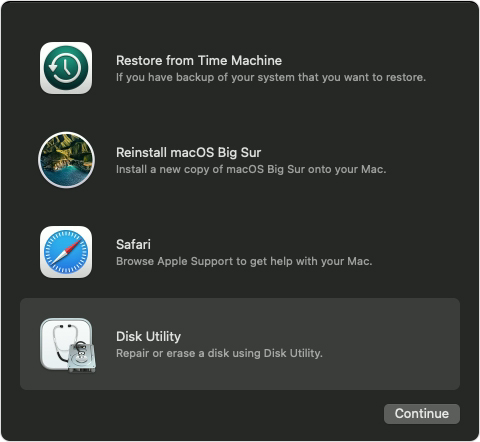
- From the utilities window, select Disk Utility and click Continue.
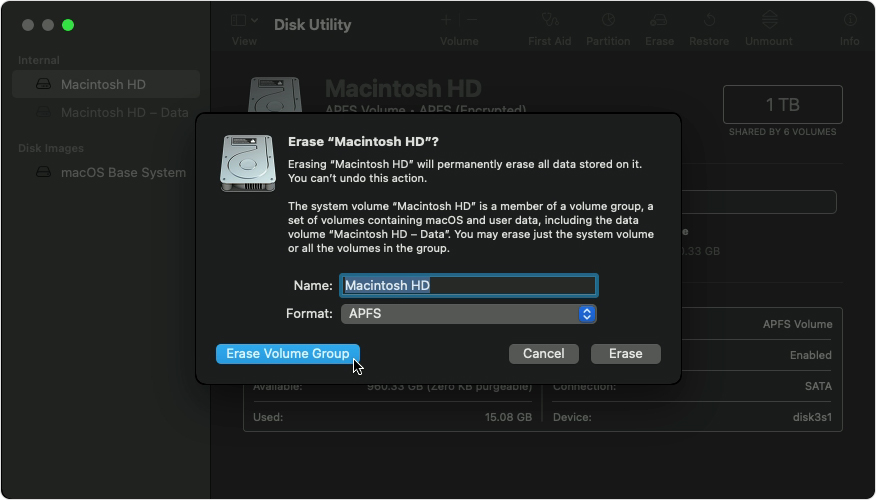
- Select Macintosh HD in the sidebar of Disk Utility. Can't see Macintosh HD?
- Click the Erase button in the toolbar, then enter the requested details:
- Name: Macintosh HD
- Format: APFS or Mac OS Extended (Journaled), as recommended by Disk Utility
- Click Erase Volume Group. If you can't see this button, click Erase instead.
- If asked, enter your Apple ID. Forgotten your Apple ID?
- After the erase process has been completed, select any other internal volumes in the sidebar, then click the delete volume (–) button in the toolbar to delete that volume.
- During this step, disregard any internal volume named Macintosh HD or Macintosh HD - Data, as well as any volumes in the External and Disk Images sections of the sidebar.
- Quit Disk Utility to return to the utilities window.
- If you want to start up again from the disk you've erased, select Reinstall macOS in the utilities window, then click Continue and follow the onscreen instructions to reinstall macOS.
If you can't see Macintosh HD in Disk Utility
Your built-in startup disk should be the first item listed in the Disk Utility sidebar. It's called Macintosh HD unless you've changed its name. If you can't see it there, choose Apple menu > Shut Down, then unplug all non-essential devices from your Mac and try again.
If your disk still doesn't appear in Disk Utility or Disk Utility reports that the erase process has failed, your Mac may need a service. If you need help, please contact Apple Support.

