
Missing function browser (equation terms library) in Numbers app on Mac mini

This one gets me every now and then and unfortunately i couldn't find any hints in the Apple UI or in these Community forums or the web or asking ChatGTP.


So if you are in this situation and have clicked on a cell containing an equation, and the equation is visible but the Function Browser didn't appear the way you expect it to it is probably for the following reason I'll put into an answer so i can mark it as correct. I logged Feedback with Apple using the Feedback App, hopefully they repair this show stopping UI/UX blunder.


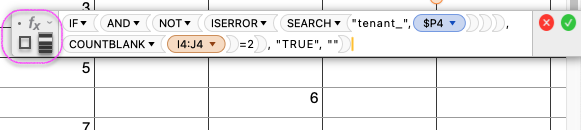
why do i see this:


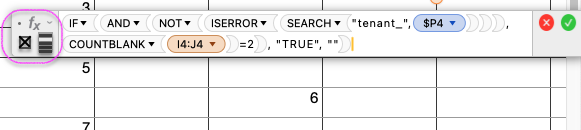
I'd much rather see this:


[Re-Titled by Moderator]

Mac mini, macOS 14.7

Posted on Feb 6, 2025 12:27 AM

Reply
Question marked as Top-ranking reply

Posted on Feb 6, 2025 12:47 AM


The answer is deceptively simple, click on the Format Icon in the top-right corner of the document window. The Function Browser visibility state is bound (disastrously IMHO) to the state of the Format tools sidebar. There is no UI hinting or Numbers help topics, or Menu Item "Show Function Browser" / "Hide Function Browser" state toggle or any other hints that these two things are bound.


If the Format sidebar is not showing it's easy enough to look around and see the word "Format" and there's a bunch of help topics to find it. Not so for the Function Browser. I provided Apple with some Feedback. I hope they fix this to some extent at least with a Fx Menu item to show the Function Browser or some other kind of toggle on the Equation Editor floating window or the main document window or in the App menus. Preferably with or more than one solution to make it more discoverable. And putting something in the Help that comes up when you put Function Browser into the Help> Search field would be a good idea I think.


If the Function Browser goes missing when you click in a formula or a cell set to take a formula, its because either:

A) the user clicked on the Format Icon (top-right corner of document window) to hide the Format sidebar tools

B) clicked on the Organise Icon to Sort, Filter,… a table, in which case there is just a blank grey space where the Function Browser should be appearing when working with an Equation. That's more of a hint at least.


Doing either of these things will determine that when a formula text is selected, the Formula Browser does not appear on the right hand side of the document window.


when in hidden state:

when in visible state:


8 replies
Question marked as Top-ranking reply

Feb 6, 2025 12:47 AM in response to wideEyedPupil


The answer is deceptively simple, click on the Format Icon in the top-right corner of the document window. The Function Browser visibility state is bound (disastrously IMHO) to the state of the Format tools sidebar. There is no UI hinting or Numbers help topics, or Menu Item "Show Function Browser" / "Hide Function Browser" state toggle or any other hints that these two things are bound.


If the Format sidebar is not showing it's easy enough to look around and see the word "Format" and there's a bunch of help topics to find it. Not so for the Function Browser. I provided Apple with some Feedback. I hope they fix this to some extent at least with a Fx Menu item to show the Function Browser or some other kind of toggle on the Equation Editor floating window or the main document window or in the App menus. Preferably with or more than one solution to make it more discoverable. And putting something in the Help that comes up when you put Function Browser into the Help> Search field would be a good idea I think.


If the Function Browser goes missing when you click in a formula or a cell set to take a formula, its because either:

A) the user clicked on the Format Icon (top-right corner of document window) to hide the Format sidebar tools

B) clicked on the Organise Icon to Sort, Filter,… a table, in which case there is just a blank grey space where the Function Browser should be appearing when working with an Equation. That's more of a hint at least.


Doing either of these things will determine that when a formula text is selected, the Formula Browser does not appear on the right hand side of the document window.


when in hidden state:


when in visible state:


Feb 6, 2025 10:34 AM in response to wideEyedPupil

I completely don't understand what you're saying.


In your example.


How do you know that IF() is the function you want help with, as opposed to the AND(), or the NOT(), or the ISERROR(), or the SEARCH(), or the COUNTBLANK()?


Indeed, while the formula browser might not appear automatically, it's trivial to display.


Each function has an adjacent downward triangle. Clicking this shows options including 'Show in Function Browser' which takes you to the browser for that specific function.


In your true/false state, I can't see how Numbers is supposed to know which function to focus on.

Feb 13, 2025 6:43 PM in response to Camelot

Regarding your other question/comment about IF, NOT, AND etc…


This post had nothing to do with the particular formula posted in the screenshot(s). As the title indicates, it's about the Function Browser sidebar going missing at times and there being no immediate accounting for the reason as to why (the fact that it the appearance of the Function Browser is bound to the state of the Format sidebar visibility).

Feb 13, 2025 6:40 PM in response to Camelot

thanks. I've never used the "show function in browser" and I did see it but didn't read closely enough to try it i guess. I do use the "show function name as text" occasionally, but usually I'm able to coerce that behaviour by clicking and in the formula somehow.


I still think that there's an issue as described in my OP.


The "Format" button is bound to the appearance of the Formula Browser and that is illogical to my mind, and needs some kind of clarification in the UI.


Please understand I took the time to write this an log on the Apple Feedback app because it's a point of user friction, at least for me and there must be others who go through this, even if non-neurotypical people. Saying "you missed this workaround thing I know about… so i have no idea what yu are talking about" shows that either A) yes you do know what I'm talking about but you have an adequate solution that you never forget or

B) you haven't experienced what I'm talking about but have offered a solution that I didn't think of.


In both cases your workaround solution is helpful, but the denial of the UI issue in the first place is not helpful. Thanks.

This thread has been closed by the system or the community team. You may vote for any posts you find helpful, or search the Community for additional answers.

Missing function browser (equation terms library) in Numbers app on Mac mini

Welcome to Apple Support Community
A forum where Apple customers help each other with their products. Get started with your Apple Account.


