Add dates for Summary by Category

In the Personal Budget template, I set up monthly budget and it summarizes actual and compares to budget. But as I began adding a second or third..... month of transactions, I want to have monthly transactions for comparison to budget. How can I add dates so that transactions can be selected for specific periods of time?

iMac 21.5″, macOS 14.6

Posted on Mar 7, 2025 12:02 PM

Reply
Question marked as Top-ranking reply

Posted on Mar 7, 2025 1:53 PM

In addition to the pivot tables, I inserted a month column in my budget

In this model you find in


B2=MONTH($A2)


You drag this formula down

Then I put a header line below with a subtotal


D23=SUBTOTAL(9;AMOUNT)


In this way I use the month column to select with a quick filter one or more months and I also have the total related to the filter used.

3 replies
Question marked as Top-ranking reply

Mar 7, 2025 1:53 PM in response to JGildero

In addition to the pivot tables, I inserted a month column in my budget

In this model you find in


B2=MONTH($A2)


You drag this formula down

Then I put a header line below with a subtotal


D23=SUBTOTAL(9;AMOUNT)


In this way I use the month column to select with a quick filter one or more months and I also have the total related to the filter used.

Mar 7, 2025 12:39 PM in response to JGildero

Unfortunately, IMO, this is where Apple went wrong with the Personal Budget template.


While it works well for what it does, it lacks the polish for things like date filtering. Granted, that would make it more complicated but that's often what people need.


So to answer your question you have to decide what's most important for you.


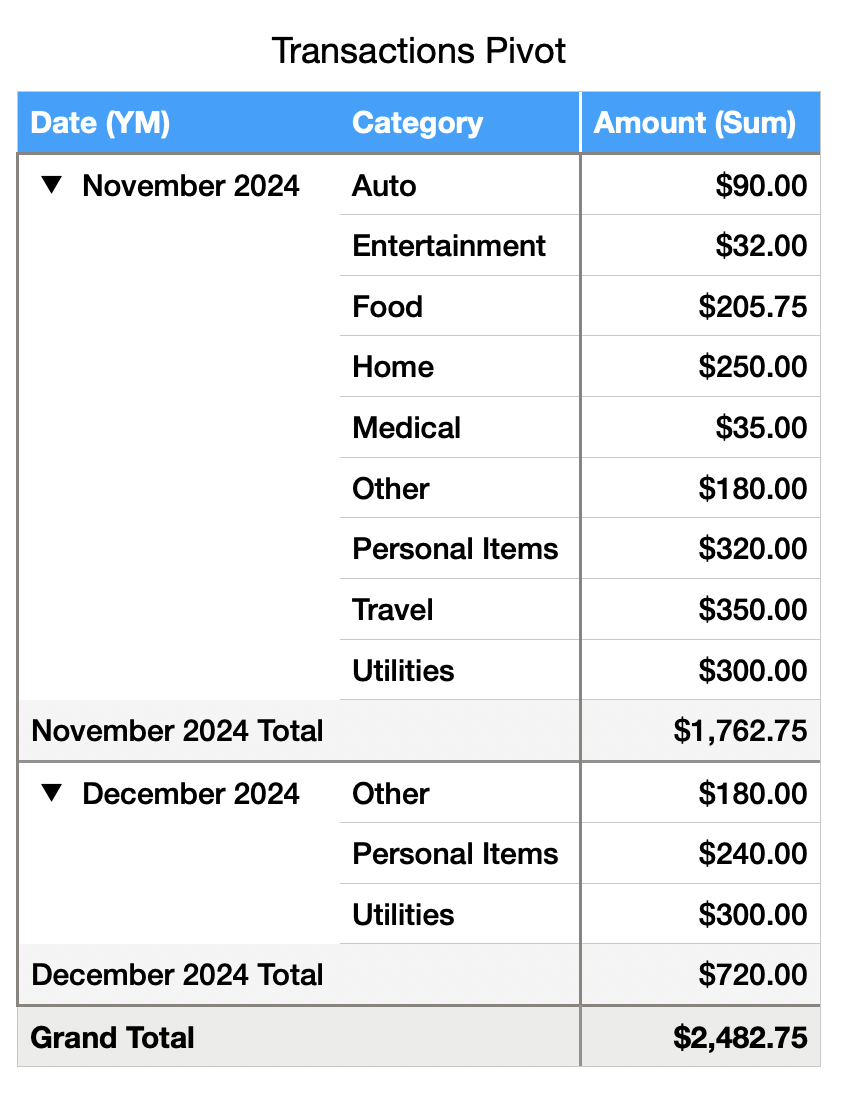
In my case, I like the Pivot Table option which makes it simple (literally three clicks) to get a breakdown of category spending by month. However, this makes it hard to incorporate the budget/difference calculation and, potentially, the charts, so if those are what's important to you then it may not be the best approach.


Another option involves added a Month header to the Summary table where you select a month and it limits the table to that month. This can work well for a single month-at-a-time view, but makes trending over multiple months hard to see.


There are also other ways of slicing and dicing the data. It all depends on what you want to get out of it. Many options will involve adding additional fields to the Transactions table to help categorize and filter the data.


Here's an example of the Pivot Table approach:

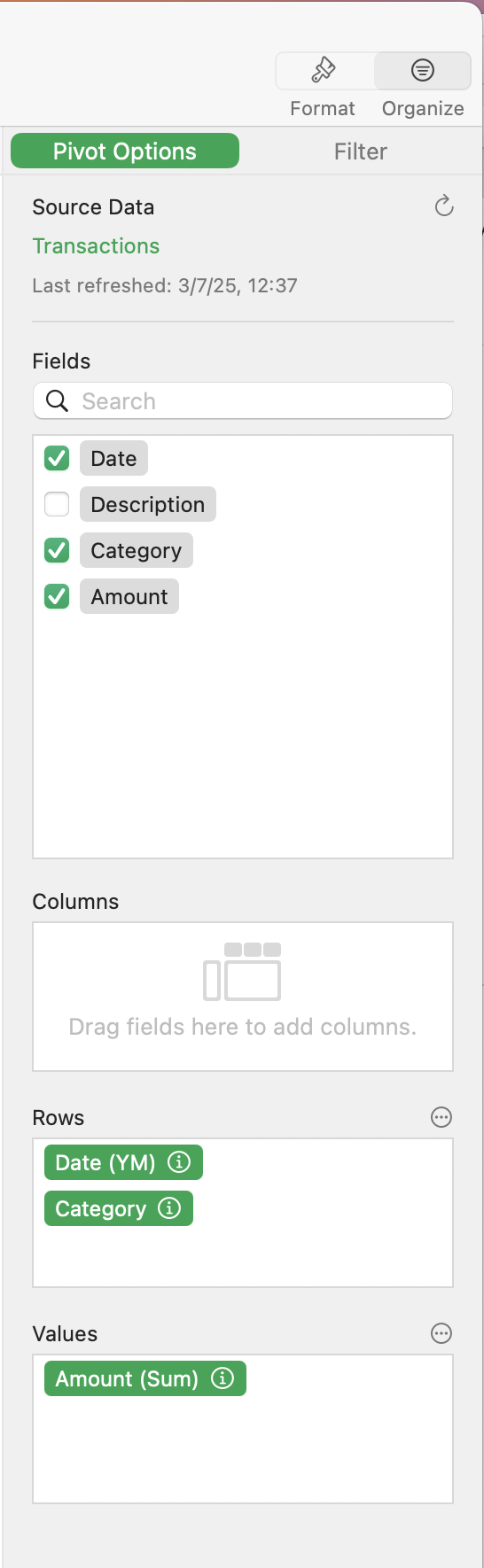
From the Transactions Table, just select Organize -> Create Pivot Table and set it up as follows:


This thread has been closed by the system or the community team. You may vote for any posts you find helpful, or search the Community for additional answers.

Add dates for Summary by Category

Welcome to Apple Support Community
A forum where Apple customers help each other with their products. Get started with your Apple Account.
