Multiple Pop-Up Menu Options to Influence a Result in a Separate Cell

I've created a simple table with 6 drop down boxes (B2-7), each with multiple options, as a quick triage tool. Is there a formula that would populate B8, from a pool of 6 options, based upon my selections from the drop down options? As an example if the options on the screenshot were selected B8 would show "Nerve Agent", in addition, "Unknown" is also an option in each drop down menu so for the result (B8), for example B2 could be "Convulsions" OR "Unknown" and so on for B2-7.

MacBook Air 13″, macOS 15.4

Posted on Apr 10, 2025 1:13 PM

Reply
Question marked as Top-ranking reply

Posted on Apr 10, 2025 2:28 PM

Preface: This looks like medical diagnosis, and I'm not a medical professional qualified to provide diagnoses. My response here is purely in response to one method to populate a 'result' based on multiple inputs.


This is a lot harder to do than you might think, mostly because of the sheer number of permutations and combinations involved.

Add to that the 6-dimensional array where things like 'Convulsions' and 'Increased Respiration' plus 'Sweaty Skin' could indicate 'Poison', but not if eyes are dilated (clearly I'm just making this up, I am not a doctor :) )


The way these things are normally done is via a 'weighting' score, where each symptom is given a value which, when added to the other values in some way, comes up with a diagnosis code, which you can then look up.


My first run at this involved creating a series of tables, one per symptom category, each with the possible conditions and a value (this works best if there are no more than 9 possible options):
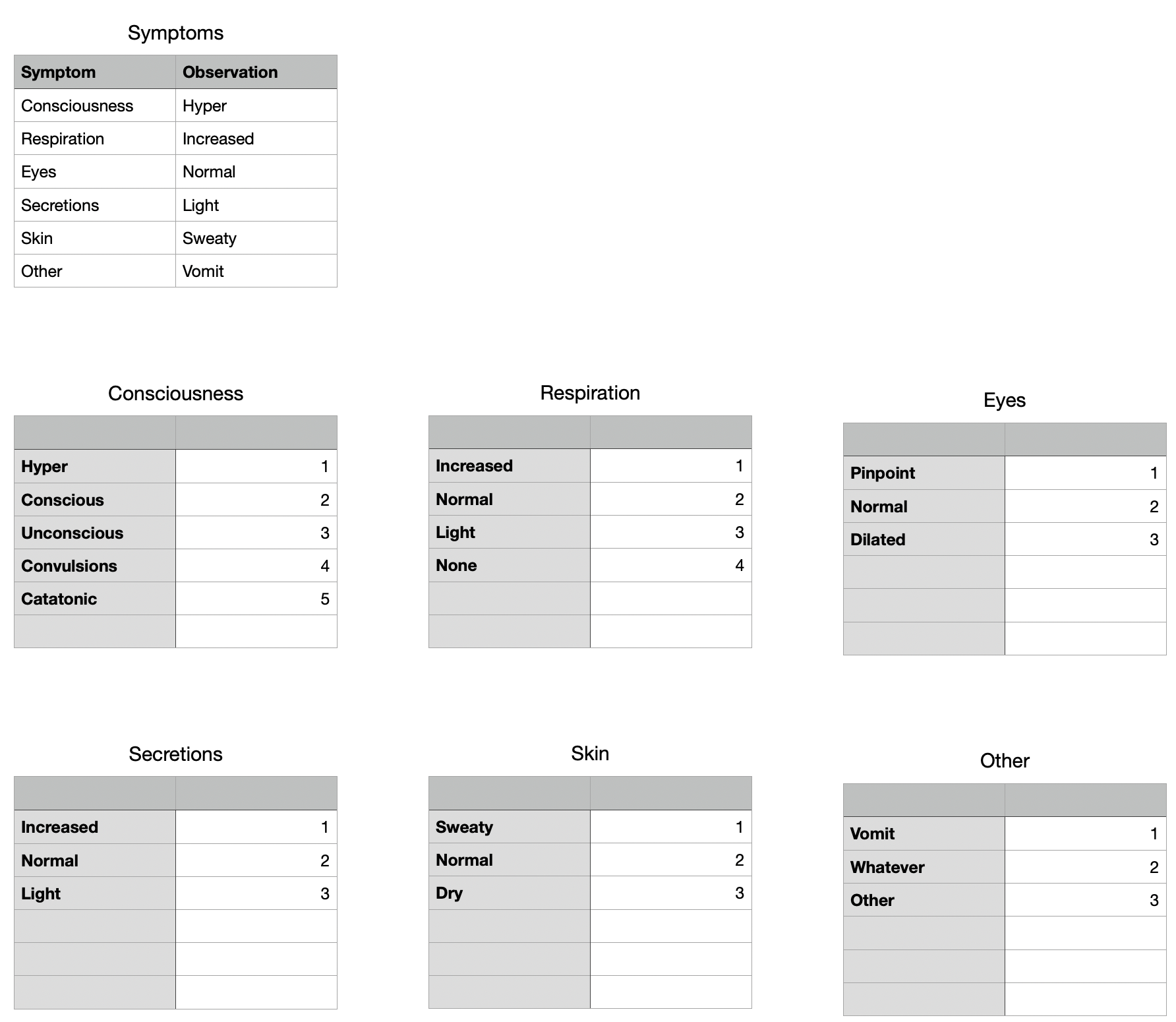


(the sub-tables can be on a separate sheet. I just have them here for ease of use)


Now you can write some formula that combines the values into a unique code. As long as there are no more than 9 options (+ 'Unknown'), the easiest would be to use a single digit per symptom where the first digit matches the 'Consciousness' value, second represents 'Respiration', third 'Eyes' and so on.


Here's a formula that does that:


=VALUE(
 XLOOKUP(Symptoms::B2,Consciousness::A,Consciousness::B,"0",0,1)&

XLOOKUP(Symptoms::B3,Respiration::A,Respiration::B,"0",0,1)&


XLOOKUP(Symptoms::B4,Eyes::A,Eyes::B,"0",0,1)&


XLOOKUP(Symptoms::B5,Secretions::A,Secretions::B,"0",0,1)&


XLOOKUP(Symptoms::B6,Skin::A,Skin::B,"0",0,1)&


XLOOKUP(Symptoms::B7,Other::A,Other::B,"0",0,1)
)


This uses a series of XLOOKUP()s to match the menu selection in the Symptoms table to entries in the sub-tables, and comes up with a six-digit number like '112311' which represents the unique combination for the options selected.


Now comes the hard part. You need to build a separate table with all the possible combinations and their Probable Causes. Now, there may be ways to simplify the construction of this table, but I'm not qualified to know what that may be, so opted for a manual table, which looks like:
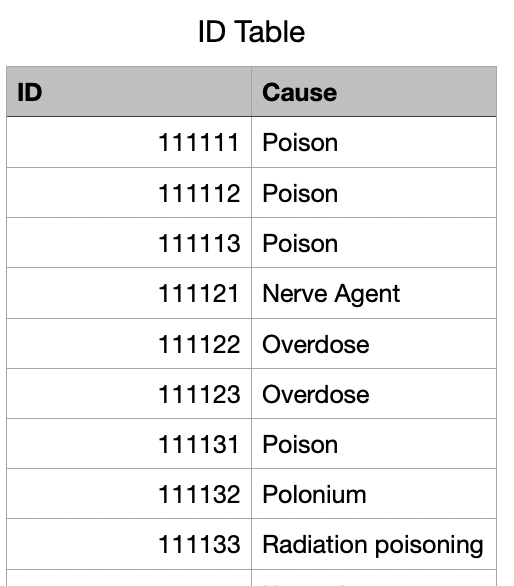


Now it's simple to lookup the code generated earlier to find the corresponding Probable cause:



Where the score is taken from the formula above, and the Probable Cause cell says:


=XLOOKUP(A2,ID Table::ID,ID Table::Cause,"UNKNOWN",0,1)



Similar questions

1 reply
Question marked as Top-ranking reply

Apr 10, 2025 2:28 PM in response to iChris91

Preface: This looks like medical diagnosis, and I'm not a medical professional qualified to provide diagnoses. My response here is purely in response to one method to populate a 'result' based on multiple inputs.


This is a lot harder to do than you might think, mostly because of the sheer number of permutations and combinations involved.

Add to that the 6-dimensional array where things like 'Convulsions' and 'Increased Respiration' plus 'Sweaty Skin' could indicate 'Poison', but not if eyes are dilated (clearly I'm just making this up, I am not a doctor :) )


The way these things are normally done is via a 'weighting' score, where each symptom is given a value which, when added to the other values in some way, comes up with a diagnosis code, which you can then look up.


My first run at this involved creating a series of tables, one per symptom category, each with the possible conditions and a value (this works best if there are no more than 9 possible options):


(the sub-tables can be on a separate sheet. I just have them here for ease of use)


Now you can write some formula that combines the values into a unique code. As long as there are no more than 9 options (+ 'Unknown'), the easiest would be to use a single digit per symptom where the first digit matches the 'Consciousness' value, second represents 'Respiration', third 'Eyes' and so on.


Here's a formula that does that:


=VALUE(
 XLOOKUP(Symptoms::B2,Consciousness::A,Consciousness::B,"0",0,1)&

XLOOKUP(Symptoms::B3,Respiration::A,Respiration::B,"0",0,1)&


XLOOKUP(Symptoms::B4,Eyes::A,Eyes::B,"0",0,1)&


XLOOKUP(Symptoms::B5,Secretions::A,Secretions::B,"0",0,1)&


XLOOKUP(Symptoms::B6,Skin::A,Skin::B,"0",0,1)&


XLOOKUP(Symptoms::B7,Other::A,Other::B,"0",0,1)
)


This uses a series of XLOOKUP()s to match the menu selection in the Symptoms table to entries in the sub-tables, and comes up with a six-digit number like '112311' which represents the unique combination for the options selected.


Now comes the hard part. You need to build a separate table with all the possible combinations and their Probable Causes. Now, there may be ways to simplify the construction of this table, but I'm not qualified to know what that may be, so opted for a manual table, which looks like:


Now it's simple to lookup the code generated earlier to find the corresponding Probable cause:


Where the score is taken from the formula above, and the Probable Cause cell says:


=XLOOKUP(A2,ID Table::ID,ID Table::Cause,"UNKNOWN",0,1)



This thread has been closed by the system or the community team. You may vote for any posts you find helpful, or search the Community for additional answers.

Multiple Pop-Up Menu Options to Influence a Result in a Separate Cell

Welcome to Apple Support Community
A forum where Apple customers help each other with their products. Get started with your Apple Account.