How can I convert a valid date in Numbers?

I've been downloading historical data from my electricity bill but the dates are (e.g.)

2025-01-01T01:30:00+00:00

I'm very rusty on my functions and I understand that this is an ISO 8601 UTC format.

Is there a function which will convert this to give me decimal time to use in my chart?

I have managed to break it down to its components OK but it seems to be a clumsy way to do this?

Is there some form of DATEVALUE in Numbers for this?

Thank you


[Re-Titled by Moderator]

Original Title: convert 2025-01-01T01:30:00+00:00 to a valid date


Mac mini (M2, 2023)

Posted on Jun 10, 2025 7:52 AM

Reply
Question marked as Top-ranking reply

Posted on Jun 10, 2025 2:12 PM

Date:

Cell C2 formula =DATEVALUE(TEXTBEFORE(B2,"T"))

This takes the YYYY-MM-DD and converts it into a date&time value with time of 12:00AM


Decimal time of day if the times all end in "+00:00":

Cell D2 formula =TIMEVALUE(TEXTBETWEEN(B2,"T","+"))

This takes the HH:MM:SS and converts it to a decimal time of day (the fraction of 24 hrs).


Add the two to get the date + the time:

=DATEVALUE(TEXTBEFORE(B2,"T"))+TIMEVALUE(TEXTBETWEEN(B2,"T","+"))


6 replies
Question marked as Top-ranking reply

Jun 10, 2025 2:12 PM in response to Terry Q Brinkworth

Date:

Cell C2 formula =DATEVALUE(TEXTBEFORE(B2,"T"))

This takes the YYYY-MM-DD and converts it into a date&time value with time of 12:00AM


Decimal time of day if the times all end in "+00:00":

Cell D2 formula =TIMEVALUE(TEXTBETWEEN(B2,"T","+"))

This takes the HH:MM:SS and converts it to a decimal time of day (the fraction of 24 hrs).


Add the two to get the date + the time:

=DATEVALUE(TEXTBEFORE(B2,"T"))+TIMEVALUE(TEXTBETWEEN(B2,"T","+"))


Jun 10, 2025 1:14 PM in response to Terry Q Brinkworth

There is no built-in UTC conversion, so you'll have to roll your own.


There are a couple of ways of doing it. It sounds like you've already played with parsing the UTC string into components, so it's mostly a matter of adding them up.


Even then there are a few approaches to consider. You might break the components into separate cells for clarity. I opted for using LET() to break out the components. Here's the formula I used (with cell C10 as the cell containing a UTC string):
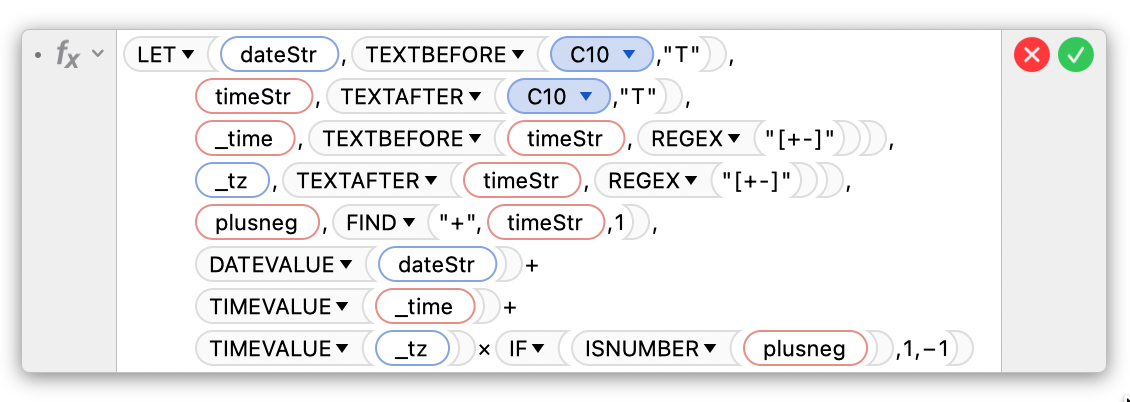


LET(dateStr,TEXTBEFORE(C10,"T"),
	
    timeStr,TEXTAFTER(C10,"T"),

    _time,TEXTBEFORE(timeStr,REGEX("[+-]")),

    _tz,TEXTAFTER(timeStr,REGEX("[+-]"))

	plusneg,FIND("+",timeStr,1),

    DATEVALUE(dateStr)+
	TIMEVALUE(_time)+
	TIMEVALUE(_tz)×IF(ISNUMBER(plusneg),1,−1)
)

It probably needs some explaining :)


First, if you're not familiar with LET(), it lets you assign variable names to sub-formulas. In this case, I create 4 variables, namely:


dateStr ,TEXTBEFORE(C10,"T")


This parses cell C10 and extracts the first element up to the T character. This is now referred to as dateStr


timeStr,TEXTAFTER(C10,"T"),


This does a similar thing, except it takes everything after the T and calls it timeStr


The timeStr needs some extra processing, though, to extract the timezone offset;


_time,TEXTBEFORE(timeStr,REGEX("[+-]")),


This takes the aforementioned timeStr and captures all the text up to the + or - sign (the offset could be positive or negative), and calls this _time.


Similarly,


_tz,TEXTAFTER(timeStr,REGEX("[+-]")),


does a similar regular expression match and captures everything after the +/-, and calls this _tz.


Finally, we run a quick FIND() to see if there's a positive offset in the time zone:


plusneg,FIND("+",timeStr,1),


Now we have the UTC string broken into components we can easily work with, dateStr, _time, and _tz. We can simply add them together:


DATEVALUE(dateStr)+
	TIMEVALUE(_time)+
	TIMEVALUE(_tz)×IF(ISNUMBER(plusneg),1,−1)


Note that we convert the dateStr to a valid DATE value, then add the _time component. Last thing to go is add or subtract the timezone offset, which is done by multiplying the _tz value by either 1 or -1, depending on whether there's a positive or negative offset.


So it looks like a lot, but hopefully it makes sense.

Jun 12, 2025 3:32 AM in response to Terry Q Brinkworth

Since the ISO format is standardized you can easily and reliably use familiar "old school" LEFT and MID functions too.


=DATEVALUE(LEFT(A2,10))+TIMEVALUE(MID(A2,12,8))


Or, if you have to do this a lot, a short AppleScript can save you work because it will convert in situ without you having to set up an extra column with a formula each time.


tell front document of application "Numbers"
	tell active sheet
		tell (first table whose class of selection range is range)
			repeat with c in cells of (get selection range)
				set isoDateStr to value of c
				tell isoDateStr to set value of c to text 1 thru 10 & " " & text 12 thru 19
			end repeat
		end tell
	end tell
end tell


  1. Copy-paste script into Script Editor (in Applications > Utilities)
  2. Select the cells with the ISO dates you need to convert.
  3. Click the triangle 'run' button in Script Editor


Setting this up takes less than a minute.


The first time you may need to give Script Editor permissions by switching on 'Script Editor' at System Settings > Privacy & Security.


Be sure to test on a copy of your data to make sure it is doing the right thing.


For convenience, if you are doing this repeatedly, you can put the script in a Shortcut that you can run from the menu bar or a keyboard shortcut.


SG


Jun 10, 2025 6:20 PM in response to Terry Q Brinkworth

I get similar dates on .csv files exported from WeatherCat & opened in Numbers (either Numbers 2.3/'09 or Numbers 14.4 in Sequoia. I've been using Find and Replace, using Match Case in the "gear" menu on each file. It's a royal pain which is why I only compile this data one a month or so. I may give Camelot's or Badunit's formulas a try & see which is more efficient.

This thread has been closed by the system or the community team. You may vote for any posts you find helpful, or search the Community for additional answers.

How can I convert a valid date in Numbers?

Welcome to Apple Support Community
A forum where Apple customers help each other with their products. Get started with your Apple Account.

