nulz wrote:
I will have to bring my laptop away from my university for those tests; everything I have been testing has been on teaching lectern with iMacs or faculty laptops; hooked up to different projectors via HDMI or USB-C; Thus, this has been problem for people giving presentations; my clients don't do AirPlay on campus wi-fi.
If the projector is directly attached, there should NOT even be a "Stop Extending" button. This is meant for Airplay devices only.
The only thing I can advise in this instance is to just unplug the HDMI cable when you're done.
That is what is supposed to happen, anyway. Your mac is supposed to detect directly attached displays and adjust automatically when they are disconnected.
Connecting via USB-C or HDMI should not use Airplay at all, but you seem to be seeing something that I too have seen in one or two occasions: even though the project is directly attached, the Mac behaves as if it were using Airplay. That, in my mind, is a bug.
I am running my Mac with an HDMI display, and every day when teaching with HDMI or VGA projectors.
Here is what I see: NO "stop extending" because the display is directly attached. To stop just disconnect the display.
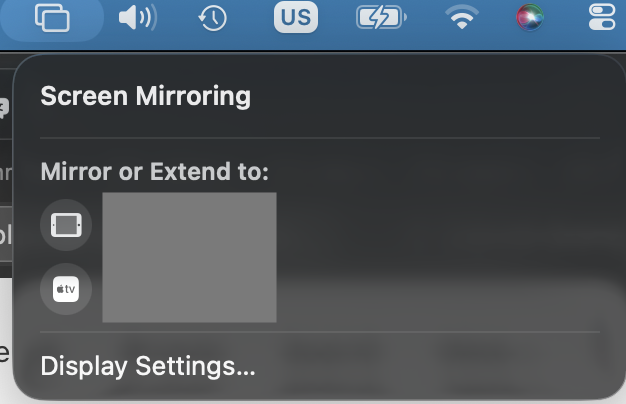
Now here is what I see when my Apple TV is being used as extended display. Note that my HDMI attached display never even shows here, even though it is still in use (but of course shows in System Settings->Displays).
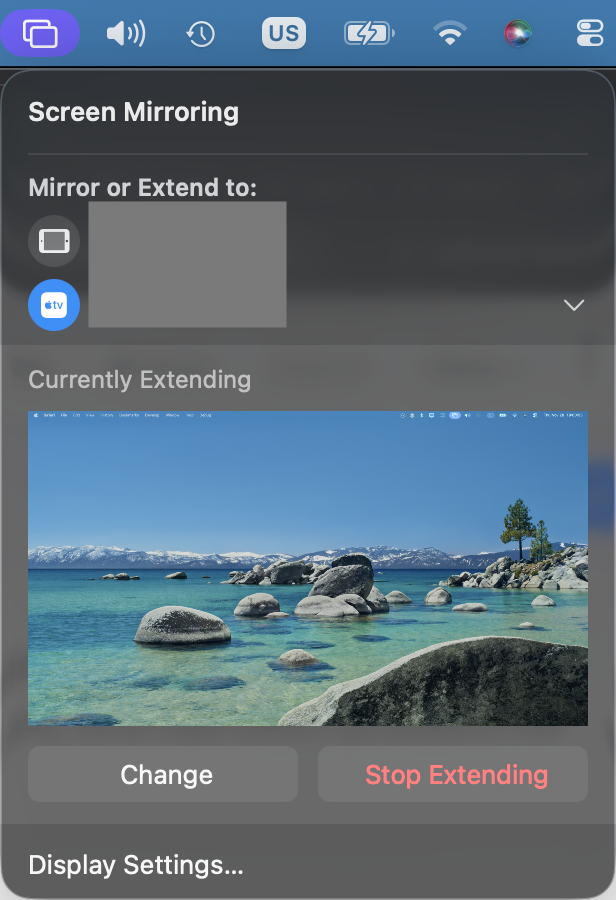
I can click on "Stop Extending" and then extend again without issue.
Bottom line is yes, this is a bug: directly connected displays are sometimes treated as if they were Airplay devices.


