Convert trading datas, 'date and time'

I have some trading data with 'opening time' date and time represented in the format as, '14/02/2025 20:46:05.087'. I need to convert it so Numbers recognises this as date and time.


Ideally I want to use this data to analyse and filter.


My attempts have included using Left and Right formulas, but whatever I do Apple Numbers represents both the original input or formatted as either a 'formula' or 'text' only, not as a 'date and time' and I can not do any analysis or filtering of such data.


All inputs welcome. Thanks!

Posted on Feb 14, 2025 8:20 PM

Reply
Question marked as Top-ranking reply

Posted on Feb 16, 2025 7:15 PM

Here is another approach using the same basic idea (the same text functions). Thankfully the time of day can be coaxed out in one step by multiplying that part of the string by 1.


=DATE(TEXTBETWEEN(A2,"/"," ",2),TEXTBETWEEN(A2,"/","/"),TEXTBEFORE(A2,"/"))+TEXTAFTER(A2," ")×1


Day is the text before the first "/"

Month is the text between the two "/"

Year is the text after the second "/" and before the " "

Time of day is the text after the " ", multiplied by 1.


If you want to sort by the time only, you need to create a column that is just the time. Unless you absolutely need the date and time stuck together, you can make one column for the date and the next column for the time. To sort by date and time you can use the Organize sidebar to make a sort that does just that (i.e., sorts by multiple columns) or I think you can sort by the time column then sort by the date column to accomplish the same thing, but don't hold me to that.

10 replies
Question marked as Top-ranking reply

Feb 16, 2025 7:15 PM in response to Mmm_K

Here is another approach using the same basic idea (the same text functions). Thankfully the time of day can be coaxed out in one step by multiplying that part of the string by 1.


=DATE(TEXTBETWEEN(A2,"/"," ",2),TEXTBETWEEN(A2,"/","/"),TEXTBEFORE(A2,"/"))+TEXTAFTER(A2," ")×1


Day is the text before the first "/"

Month is the text between the two "/"

Year is the text after the second "/" and before the " "

Time of day is the text after the " ", multiplied by 1.


If you want to sort by the time only, you need to create a column that is just the time. Unless you absolutely need the date and time stuck together, you can make one column for the date and the next column for the time. To sort by date and time you can use the Organize sidebar to make a sort that does just that (i.e., sorts by multiple columns) or I think you can sort by the time column then sort by the date column to accomplish the same thing, but don't hold me to that.

Feb 15, 2025 3:39 PM in response to Mmm_K

I'll go out on a limb here and say that it does look like a bug - any date input with milliseconds is converted to text and/or automatic. While there are custom cell formatting options to display milliseconds, I couldn't find a reliable way of making it work, which matches your finding.


I was able to construct a table that took the date field as you provided, used a number of text parsing functions (mainly TEXTBEFORE(), TEXTBETWEEN() and TEXTAFTER() ) to break out the components, then used a combination of DATE() and DURATION() to create a date field that could be used in other functions.


This table shows how I broke the components down:
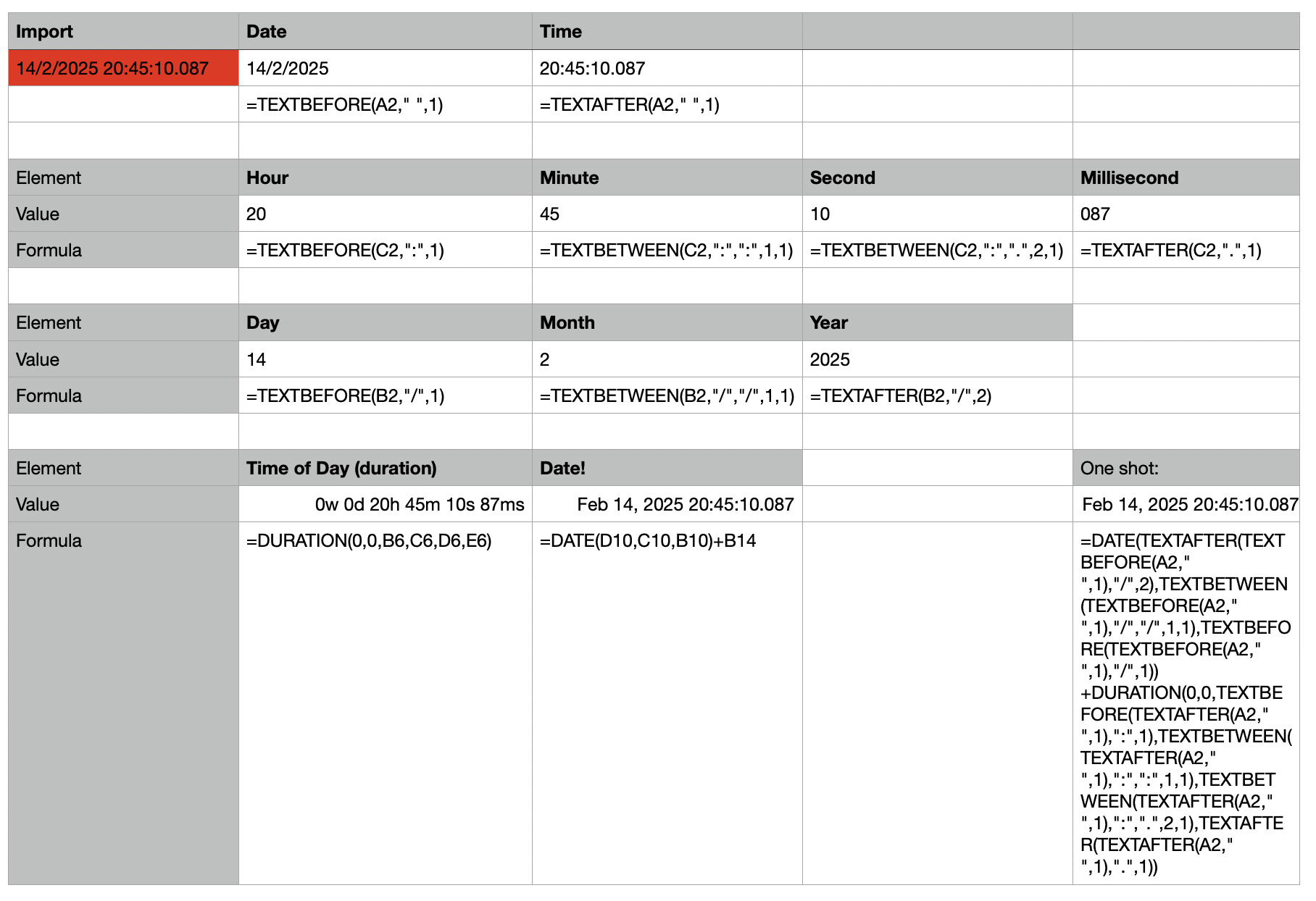


You can copy the individual components' formulas as-is, or incorporate them into one single function that looks like:


=DATE(TEXTAFTER(TEXTBEFORE(A2," ",1),"/",2),TEXTBETWEEN(TEXTBEFORE(A2," ",1),"/","/",1,1),TEXTBEFORE(TEXTBEFORE(A2," ",1),"/",1))+DURATION(0,0,TEXTBEFORE(TEXTAFTER(A2," ",1),":",1),TEXTBETWEEN(TEXTAFTER(A2," ",1),":",":",1,1),TEXTBETWEEN(TEXTAFTER(A2," ",1),":",".",2,1),TEXTAFTER(TEXTAFTER(A2," ",1),".",1))


Note that any text parsing is dependent on the input format. Since this is automated, there shouldn't be too much problem, but any changes in the input format may affect the results.


Feb 17, 2025 4:14 PM in response to Mmm_K

> Not sure how to filter the ‘time’ only


You need to have a specific columns with just the time data.


You'll need to use some formula based on my earlier to table to extract the time component and construct a new TIME() field, then you can sort on this.


The TIME() function takes an hour, minute and second parameter, and I gave an earlier example of how to extract these components.

Feb 16, 2025 5:18 PM in response to Camelot

Update: okay so this will allow me to sort this newly created column (as per the provided formula) reliably. Thanks.


Now, how can I sort based on time only? I.e I want to be able to filter to show all rows whereby the time occurs before say 11:00am?

I can't, as per Numbers default options work out how to do it?? Unless I convert say 11:00am to, 1100 (of which I will need to work out how to do that too).


I am sure there is an easier solution and something I am missing??

Feb 17, 2025 2:34 PM in response to Mmm_K

> Now, how can I sort based on time only?


In order to sort the table, you need to have a specific column to sort on.


If you want to sort by time, you'll need to add a column that extracts the time component from the imported data (you can use my earlier examples to see how to do this).


Once you have a column with times, you can sort the table by that column.

This thread has been closed by the system or the community team. You may vote for any posts you find helpful, or search the Community for additional answers.

Convert trading datas, 'date and time'

Welcome to Apple Support Community
A forum where Apple customers help each other with their products. Get started with your Apple Account.
